Entra ID App Secrets and Certificates: Daily Check, Renewal on Approval
Every tenant I look at has the same problem. An app registration has a client secret. Someone created it two years ago. Nobody remembers where the value is stored. Then it expires on a Friday evening and an integration stops working.
Entra ID shows you when a secret expires. Nobody looks. So I built an Azure Function that looks every day - and renews only when I say so:
- It checks every app registration once a day.
- It mails a report: which client secrets and certificates expire soon.
- It keeps one row per app and credential in a table in Azure Table Storage - the backend.
- It renews nothing on its own. An expiring credential gets
RenewalState = Pendingin the table and waits. - An admin approves by changing that cell to
Renewable. Within 15 minutes the function creates the new secret or certificate, stores it in Azure Key Vault and writes the result back into the row.
Why not renew automatically? Because a new credential is only half of a rotation. Somebody has to switch the application to it - and I want to know who, and when, before a new secret exists. The function does the boring part: finding what expires, creating the credential correctly, putting it in Key Vault. The decision stays with a person.
It works the same way in my own tenant and in every customer tenant. All Graph calls go through one multi-tenant app registration, the rotation app. That app has no secret: it trusts the function’s user-assigned managed identity (managed identity as federated credential). GitHub Actions deploys everything with OIDC. Not a single secret is stored anywhere.
The complete project is on GitHub: BlogAssets / Automatic Credential Rotation for Entra ID Apps.
What the function does
Three functions, all PowerShell functions in one module:
| Function | Trigger | What it does |
|---|---|---|
Invoke-AppCredentialCheck | Timer, daily 05:00 UTC | Check all apps, update the state table, mail the report - renews nothing |
Invoke-AppCredentialRenewalQueue | Timer, every 15 minutes | Renew every row with RenewalState = Renewable, write the result back |
Get-AppCredentialReport | HTTP GET, function key | Read-only report: every credential, its status and its RenewalState |
The daily check decides one status per app and credential type (column CheckResult in the table):
| Status | Meaning |
|---|---|
ApprovalRequired | Expires within the threshold (default 30 days). Not renewed - waiting for approval. |
Excluded | Expires, but the app has the tag SecretRotation:Exclude - only reported |
Stale | Expired longer than the grace period ago - probably unused |
Unsupported | A key credential the function can’t renew (anything but an X.509 certificate for authentication) |
Failed | The check failed for a tenant, details in the message |
BackedUp | Public part of an existing certificate copied to Key Vault |
Apps where everything is fine don’t show up in the mail - but they have a row in the table, so you can also approve a renewal before anything expires.
Architecture
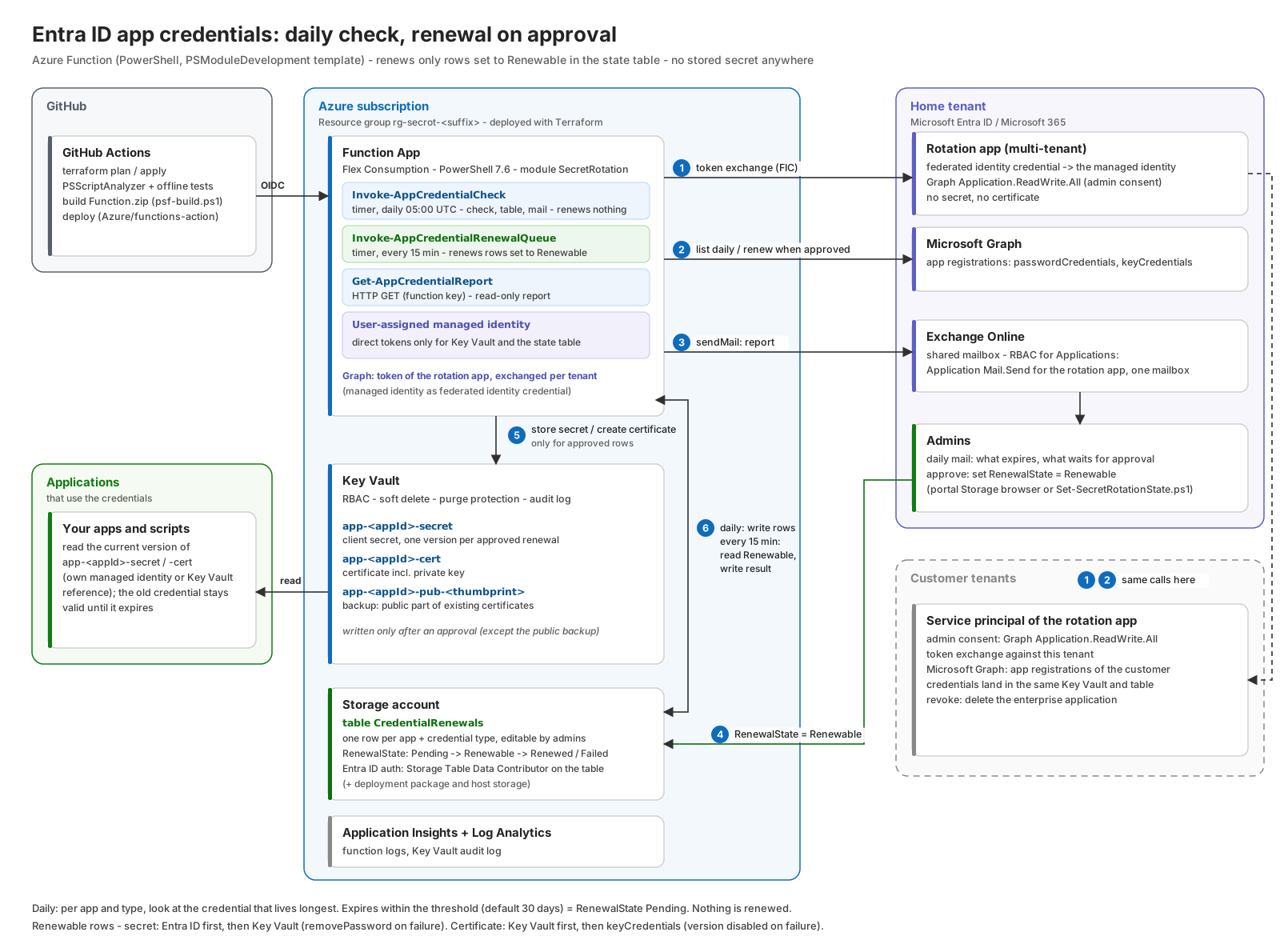
Every day:
- For each tenant - home tenant first, then the customer tenants - the function exchanges a managed identity token for a Graph token of the rotation app in that tenant.
- It lists all app registrations with their
passwordCredentials(client secrets) andkeyCredentials(certificates) from Microsoft Graph and decides per app and type (see “The decision” below). - It writes the result into the renewal state table. Expiring credentials get
RenewalState = Pending. - It sends one mail (Graph
sendMail) with everything that waits for approval - each line names its table row.
On approval:
- An admin sets
RenewalStateof that row toRenewable- in the Azure portal, in Storage Explorer or with a small script. - Within 15 minutes the renewal queue claims the row (
InProgress), creates a new client secret withaddPasswordor a new certificate in Key Vault plus aPATCHofkeyCredentials, stores it in Key Vault as a new version ofapp-<appId>-secretorapp-<appId>-cert, and writesRenewed(orFailedwith the reason) back into the row. A mail confirms it.
The old credential stays on the app until it expires. Your applications switch to the new version in their own time.
What can be saved to Key Vault - and what can’t
Can the function also save the existing secrets? Only partly. The reason is in Entra ID, not in the function.
Client secrets: Entra ID returns the value of a secret exactly once, in the response of addPassword. After that you only get the hint - the first three characters. The passwordCredential documentation is clear: “There is no way to retrieve this password in the future.” So the function can store every secret it creates on approval. It can’t back up existing ones.
Certificates: Entra ID only stores the public key. The private key was never in Entra ID. What the function can do: copy the public certificate of every existing certificate credential to Key Vault, as secret app-<appId>-pub-<thumbprint> with the content type application/pkix-cert. That documents which certificate an app trusts and helps you find the matching private key later. It doesn’t replace the private key.
If you still have an old secret value (password manager, an old pipeline variable), scripts/Import-ExistingAppSecret.ps1 brings it into the same structure. It asks for the value as SecureString, proves it works with a client_credentials token request, finds the matching credential by its hint and stores it with the same tags the function writes:
1
./scripts/Import-ExistingAppSecret.ps1 -AppId $appId -TenantId $tenantId -KeyVaultName kv-secrot-ab12c
If Key Vault already holds a secret that lives longer, the script stops. Otherwise the import would become the “current” version and replace the newer secret.
The scaffold: PSModuleDevelopment’s AzureFunction template
Like in my Azure Update Manager post, I didn’t start with func init. I used the AzureFunction template from Friedrich Weinmann’s PSModuleDevelopment:
1
2
3
4
5
6
7
Install-Module PSModuleDevelopment -Scope CurrentUser
Invoke-PSMDTemplate -TemplateName AzureFunction -OutPath ./function-app -Parameters @{
    name        = 'SecretRotation'
    author      = 'Constantin Hager'
    company     = 'the-itguy.de'
    description = 'Azure Function App that monitors Entra ID app secrets and certificates and renews them into Azure Key Vault'
}
You write a normal PowerShell module. The folder decides the trigger: a function in functions/timerTrigger becomes a timer trigger, one in functions/httpTrigger an HTTP endpoint with the same name. The build script generates function.json and run.ps1 for each of them.
1
2
3
4
5
6
7
8
9
10
11
function-app/
├── build/
│   ├── build.ps1 / psf-build.ps1   # create Function.zip
│   └── build.config.psd1           # Flex Consumption switch, schedules, auth levels, methods
├── function/                       # host.json, profile.ps1, requirements.psd1, Modules/
├── SecretRotation/
│   ├── functions/timerTrigger/     # Invoke-AppCredentialCheck.ps1, Invoke-AppCredentialRenewalQueue.ps1
│   ├── functions/httpTrigger/      # Get-AppCredentialReport.ps1
│   ├── internal/functions/         # Graph, Key Vault, Table Storage, decision, notification helpers
│   └── internal/scripts/           # module constants
└── tests/Test-SecretRotation.ps1   # offline tests against a fake Graph/Key Vault
The schedules and the HTTP method live in build/build.config.psd1. Timer triggers use NCRONTAB with seconds, in UTC:
1
2
3
4
5
6
7
8
9
10
11
12
13
14
15
16
General = @{
    FlexConsumption = $true
}
TimerTrigger = @{
    Schedule          = '0 0 5 * * *'
    ScheduleOverrides = @{
        'Invoke-AppCredentialCheck'        = '0 0 5 * * *'      # daily 05:00 UTC
        'Invoke-AppCredentialRenewalQueue' = '0 */15 * * * *'   # every 15 minutes
    }
}
HttpTrigger = @{
    AuthLevel       = 'function'
    MethodOverrides = @{
        'Get-AppCredentialReport' = @('get')
    }
}
FlexConsumption = $true makes the build bundle the modules from requirements.psd1 into the package and turns off Managed Dependencies, which Flex Consumption doesn’t support. I also set functionTimeout to 30 minutes in host.json. A tenant with a few thousand apps needs a while.
The function needs only one external module: Azure.Function.Tools for the HTTP endpoint. Everything else is plain REST - no Az module, no Microsoft Graph SDK. Same reasons as last time: cold start, no version drift, full API surface.
Authentication without a secret
There are three places where something has to authenticate. None of them uses a secret.
| Who | To what | How |
|---|---|---|
| GitHub Actions | Azure (Terraform, deployment) | App registration with federated credentials (OIDC) |
| Function | Microsoft Graph - home tenant and every customer tenant | Rotation app (multi-tenant) with the managed identity as federated identity credential |
| Function | Key Vault, state table | User-assigned managed identity, directly |
The middle row is the important one. There is exactly one way to Graph, and it’s the same in every tenant. The managed identity itself has no Graph permission at all.
Why one multi-tenant app for everything?
For an MSP, “every app in my tenant” is only half of it. The customer tenants have the same expiring secrets. I could have given the managed identity Graph permissions in the home tenant and used a second path for the customers. Two paths mean two permission models, two sets of failure modes and two things to explain in an audit. So I made the multi-tenant app the only path:
- One permission model. Graph
Application.ReadWrite.Allbelongs to the rotation app. Every tenant grants it the same way: admin consent. The home tenant is just the first tenant that consents. - Customers stay in control. A customer admin sees an enterprise application in their tenant, with exactly the permissions they consented to. Deleting it ends our access. No guest accounts, no GDAP role, no secret in our Key Vault.
- No secret anywhere. The rotation app has no client secret and no certificate. So there’s nothing the function would have to rotate for itself - and no credential that could leak.
I described the mechanism in detail in my post about cross-tenant access with a managed identity as federated credential. Here it is used for every Graph call:
- Get a token of the managed identity for the audience
api://AzureADTokenExchange. - Send it as
client_assertionto the token endpoint of the target tenant - home or customer - together with the client ID of the rotation app. - Entra ID returns a normal Graph token of the rotation app in that tenant.
1
2
3
4
5
6
7
8
9
10
11
12
13
14
15
$assertion = Get-SrAccessToken -Resource 'api://AzureADTokenExchange'
$body = @{
    client_id             = $config.RotationAppId
    scope                 = 'https://graph.microsoft.com/.default'
    grant_type            = 'client_credentials'
    client_assertion_type = 'urn:ietf:params:oauth:client-assertion-type:jwt-bearer'
    client_assertion      = $assertion
}
$param = @{
    Body        = $body
    ContentType = 'application/x-www-form-urlencoded'
    Method      = 'Post'
    Uri         = "https://login.microsoftonline.com/$TenantId/oauth2/v2.0/token"
}
$response = Invoke-RestMethod @param
SR_ROTATION_APP_ID is a required setting. Without it the function doesn’t start a run, and Terraform has no default for rotation_app_id. SR_CUSTOMER_TENANT_IDS lists the customer tenants; the home tenant is always included.
Get-SrAccessToken decides by resource which path to take:
1
2
3
4
5
6
$isGraph = $Resource.TrimEnd('/') -eq 'https://graph.microsoft.com'
if (-not $isGraph -and $TenantId -ne $config.HomeTenantId) {
    throw "Only Microsoft Graph tokens can be requested for another tenant, not '$Resource'."
}
if ($isGraph) { $token = Get-SrFederatedToken -Resource $Resource -TenantId $TenantId }
else          { $token = Get-SrManagedIdentityToken -Resource $Resource }
Tokens are cached per tenant and resource until five minutes before they expire. The rotation code doesn’t care which tenant it works in - Invoke-SrRestRequest just gets a -TenantId. The credentials of all tenants land in the same Key Vault. The app ID is part of the name, and it is unique across tenants.
Why user-assigned?
Only a user-assigned managed identity can be a federated identity credential of an app registration. A benefit: the identity exists independently of the Function App. Redeploying or even recreating the Function App doesn’t break the trust.
One wrapper for Graph and Key Vault
Invoke-SrRestRequest picks the token by host, retries on 429 and 5xx (honouring Retry-After), follows @odata.nextLink (Graph) and nextLink (Key Vault) and turns error bodies into readable exceptions. It refuses to send a token anywhere else:
1
2
3
4
5
$resource = switch -Regex (([uri]$Uri).Host) {
    '^graph\.microsoft\.com$'         { 'https://graph.microsoft.com'; break }
    '^[a-z0-9-]+\.vault\.azure\.net$' { 'https://vault.azure.net'; break }
    default { throw "Refusing to send a token to '$targetHost'. Only Microsoft Graph and Azure Key Vault are allowed." }
}
The decision
The list call is simple:
1
GET https://graph.microsoft.com/v1.0/applications?$select=id,appId,displayName,tags,passwordCredentials,keyCredentials&$top=999
The interesting part is what to report. “Every credential that expires within 30 days” is wrong. An app often has an old secret that expires next week and a new one that is valid for months - someone already rolled it over. Asking for approval there would only be noise.
So Get-SrCredentialDecision looks at the credential that lives longest, per app and type:
1
2
3
4
5
6
7
8
9
10
11
$credentials = @($credentials | Sort-Object EndDateTime -Descending)
$newest = $credentials[0]

if ($newest.EndDateTime -le $thresholdDate) {
    if ($newest.EndDateTime -lt $graceDate)                             { $decision = 'Stale' }
    elseif ($Config.ExcludeTag -and $tags -contains $Config.ExcludeTag)  { $decision = 'Excluded' }
    else {
        $decision = 'ApprovalRequired'
        $reason   = "Newest credential expires in $($newest.DaysLeft) days. Not renewed - waiting for approval."
    }
}
After an approved renewal, the next check sees the new credential and the app disappears from the mail. As long as nobody approves, the app stays in the daily mail.
A few details:
- Excluded apps. The app registration’s
tagsproperty controls it:SecretRotation:Excludemarks an app that someone else takes care of. It still shows up in the report, but doesn’t becomePending. Approving it anyway needsForce = truein the row. - Stale credentials. A secret that expired a year ago probably belongs to a dead app. Creating a new one would just add attack surface. Everything that expired longer ago than
SR_EXPIRED_GRACE_DAYS(default 7) is reported asStaleinstead ofApprovalRequired. - What counts as a certificate. Only
keyCredentialswithtype = AsymmetricX509Certandusage = Verify. The certificates an app uses to authenticate. Everything else is reported asUnsupportedwhen it expires. - Federated credentials don’t expire. They aren’t part of
passwordCredentialsorkeyCredentialsand the function ignores them.
The renewal state table
This is the backend you work with. Table CredentialRenewals lives in the storage account of the Function App. One row per app and credential type:
PartitionKey= tenant ID - so customer tenants are separatedRowKey=<appId>_<Secret|Certificate|OtherKey>
| Column | Written by | Meaning |
|---|---|---|
DisplayName, AppId, CredentialType, ExpiresOn | check | The credential (the newest one per app and type) |
CheckResult, Reason | check | Ok, ApprovalRequired, Excluded, Stale, Unsupported |
RenewalState | you, check, queue | The workflow - see below |
Force | you | true renews an app with the exclude tag too |
Comment | you | Free text, e.g. the change number |
RenewalStartedOn, RenewedOn, NewExpiresOn, VaultObject, RenewalMessage | queue | The result of the renewal |
RenewalState is the column you edit:
| RenewalState | Set by | Meaning |
|---|---|---|
None | check | Nothing to do |
Pending | check | Expires within the threshold, waits for you |
Renewable | you | Approved - renewed within 15 minutes |
InProgress | queue | Being renewed right now |
Renewed | queue | Done - see NewExpiresOn |
Failed | queue | See RenewalMessage. Set Renewable again to retry |
Declined | you | Don’t renew, no more reminders |
Approving means: open the storage account in the portal, Storage browser → Tables → CredentialRenewals, edit the row, change RenewalState to Renewable. Or in Azure Storage Explorer. Or from PowerShell:
1
2
3
4
5
6
7
8
9
$state = @{
    StorageAccountName = 'storageaccountname'
    TenantId           = $tenantId
    AppId              = 'your-app-id'
    CredentialType     = 'Secret' # or 'Certificate' depending on the credential type
    State              = 'Renewable'
    Comment            = 'Approved by CH, change 4711'
}
./scripts/Set-SecretRotationState.ps1 @state
The script refuses to create a row - a typo in the app ID shouldn’t produce a new entry. The daily mail lists the row for every credential that waits, and the exact command.
You can also approve a row whose credential doesn’t expire yet. If you set it to Renewable, you want it.
How the check writes the table
Two people (or a person and a function) editing the same row is the classic problem of a shared table. The check follows a few rules:
- Info columns are written only when they change. An unchanged app costs one read per day, no write.
RenewalStatechanges only in safe cases, decided byGet-SrNextRenewalState:
1
2
3
4
if ($state -eq 'Renewable') { return @{ State = $null } }                          # never touch an approval
if ($state -eq 'InProgress' -and $started -lt $Now.AddMinutes(-60)) { return @{ State = 'Failed' } }  # interrupted
if ($CheckResult -eq 'ApprovalRequired' -and $state -in '', 'None', 'Renewed') { return @{ State = 'Pending' } }
if ($CheckResult -eq 'Ok' -and $state -in 'Pending', 'Failed', 'Declined') { return @{ State = 'None' } }   # renewed elsewhere
- The admin wins. When the check changes
RenewalState, it sendsIf-Matchwith the ETag it read. If you edited the row in the meantime, Table Storage answers412 Precondition Failed, and the check leaves the row alone. - Typos are reported, not fixed.
RenewabelstaysRenewabel, and the daily mail lists the row as Unknown RenewalState. Values are compared case-insensitively, sorenewableworks. - Rows of deleted credentials are removed - unless they are
RenewableorInProgress. Those stay, and the queue reports why the renewal failed.
The renewal queue
Invoke-AppCredentialRenewalQueue runs every 15 minutes. Most runs are one query and nothing else:
1
2
3
$approved = @(Invoke-SrTableRequest -Operation Query -Filter "RenewalState ne 'None'" |
        Where-Object { "$($_.RenewalState)".Trim() -eq 'Renewable' })
if ($approved.Count -eq 0) { return }
For each approved row it first claims it - again with If-Match, so a row you changed back a second ago isn’t renewed:
1
2
3
4
5
6
7
$claimed = Invoke-SrTableRequest -Operation Merge -PartitionKey $row.PartitionKey -RowKey $row.RowKey -IfMatch $row.ETag -Properties @{
    RenewalState     = 'InProgress'
    RenewalStartedOn = [DateTimeOffset]::UtcNow.ToString('o')
}
if (-not $claimed) { continue }

$entry = Invoke-SrCredentialRenewal -TenantId $row.PartitionKey -AppId $row.AppId -CredentialType $row.CredentialType -Force:$force
Then it writes Renewed with RenewedOn, NewExpiresOn and the Key Vault object - or Failed with the reason - and sends one mail for the run. The secret value never goes into the table.
Table Storage with Entra ID, not with the account key
The table is accessed with REST, like everything else. Two things matter: a token for https://storage.azure.com/ and x-ms-version 2020-12-06 or newer (same as in the AUM project). Invoke-SrTableRequest only talks to the account and table from the app settings:
1
2
3
4
5
6
7
8
9
10
11
12
13
14
15
16
17
$headers = @{
    Authorization  = 'Bearer {0}' -f (Get-SrAccessToken -Resource 'https://storage.azure.com/')
    'x-ms-version' = '2020-12-06'
    'x-ms-date'    = [DateTime]::UtcNow.ToString('R')
    Accept         = 'application/json;odata=minimalmetadata'   # returns odata.etag per row
}
# MERGE without If-Match = Insert Or Merge Entity, with If-Match = Merge Entity (412 if the row changed)
$param = @{
    CustomMethod       = 'MERGE'
    Uri                = "$base(PartitionKey='$pk',RowKey='$rk')"
    Headers            = $headers
    Body               = $json
    ContentType        = 'application/json'
    SkipHttpErrorCheck = $true
    StatusCodeVariable = 'statusCode'
}
Invoke-RestMethod @param
The managed identity has Storage Table Data Contributor on this one table - not on the account. The admins group gets the same role on the same table. The storage account has default_to_oauth_authentication = true, so the portal and Storage Explorer use your Entra ID account for the table by default.
Renewing a client secret
This is what the queue does for an approved Secret row. The order matters here. The secret value only exists in the response of addPassword. So: Entra ID first, Key Vault second.
1
2
3
4
5
6
7
8
$body = @{
    passwordCredential = @{
        displayName   = 'SecretRotation {0}' -f $start.ToString('yyyy-MM-dd')
        startDateTime = $start.ToString('o')
        endDateTime   = $start.AddDays($Config.SecretValidityDays).ToString('o')
    }
}
$credential = Invoke-SrRestRequest -Method POST -Uri "$graphBase/addPassword" -Body $body -TenantId $Decision.TenantId
Then the value goes to Key Vault as a new version of app-<appId>-secret:
1
PUT https://kv-secrot-ab12c.vault.azure.net/secrets/app-<appId>-secret?api-version=2025-07-01
1
2
3
4
5
6
7
8
9
{
  "value": "<secretText>",
  "contentType": "text/plain",
  "attributes": { "enabled": true, "nbf": 1792818000, "exp": 1808370000 },
  "tags": {
    "appId": "<appId>", "appObjectId": "<objectId>", "appDisplayName": "My App",
    "tenantId": "<tenantId>", "keyId": "<keyId>", "credentialType": "ClientSecret", "createdBy": "SecretRotation"
  }
}
The keyId tag links the Key Vault version to the credential in Entra ID. nbf and exp mirror the validity, so the Key Vault portal shows the expiry too.
What if the Key Vault write fails after addPassword succeeded? Then a secret exists in Entra ID that nobody knows. It’s useless and it’s attack surface. So the function removes it again:
1
2
3
4
5
6
7
8
9
10
11
12
13
14
catch {
    $storeError = $_
    try {
        $null = Invoke-SrRestRequest -Method POST -Uri "$graphBase/removePassword" -Body @{ keyId = $credential.keyId } -TenantId $Decision.TenantId
        $rollback = 'The new secret was removed from the app again.'
    }
    catch {
        $rollback = "Removing the new secret ($($credential.keyId)) failed too: $_ - remove it manually."
    }
    throw "Could not store the new secret in Key Vault: $storeError $rollback"
}
finally {
    $credential.secretText = $null
}
The secret value never leaves these few lines. Set-SrKeyVaultSecret doesn’t return it, and nothing is logged.
Renewing a certificate
For certificates the order is the other way round: Key Vault first. Key Vault creates the key pair, so the private key never leaves the vault during this process.
1
2
3
4
5
6
7
8
9
10
11
$body = @{
    policy = @{
        key_props        = @{ exportable = $true; kty = 'RSA'; key_size = 2048; reuse_key = $false }
        secret_props     = @{ contentType = 'application/x-pkcs12' }
        x509_props       = @{ subject = "CN=$subjectName"; validity_months = 12; key_usage = @('digitalSignature', 'keyEncipherment') }
        issuer           = @{ name = 'Self' }
        lifetime_actions = @(@{ trigger = @{ days_before_expiry = 30 }; action = @{ action_type = 'EmailContacts' } })
    }
}
$operation = Invoke-SrRestRequest -Method POST -Uri "$baseUri/create?api-version=2025-07-01" -Body $body
# poll .../pending until status is 'completed', then GET the certificate
Note the explicit lifetime_actions. A Key Vault certificate can renew itself (AutoRenew). That would be harmful here: a new version that Entra ID doesn’t know would break every client that always loads the latest version - and it would bypass the approval. So the policy only sends a mail to the certificate contacts.
Then the public part has to go onto the app. There are two ways:
addKeyneeds a proof-of-possession token, signed with the private key of a certificate that is already valid on the app. If the certificate is already expired, or its private key lives on some server, that doesn’t work.PATCHofkeyCredentialsworks for every app. But PATCH replaces the whole collection. A certificate that is missing in the body is deleted.
I use PATCH. So the function first reads the existing certificates including their public keys. Graph only returns key for a single object with $select=keyCredentials:
1
GET https://graph.microsoft.com/v1.0/applications/<objectId>?$select=keyCredentials
If any credential comes back without its key, the function stops before it creates anything. Then it sends all existing certificates plus the new one:
1
2
3
4
5
6
7
8
9
10
11
12
13
14
15
foreach ($credential in $existing) {
    $keyCredentials.Add(@{
        keyId = $credential.keyId; type = $credential.type; usage = $credential.usage; key = $credential.key
        displayName = $credential.displayName; customKeyIdentifier = $credential.customKeyIdentifier
        startDateTime = ([DateTimeOffset]$credential.startDateTime).ToString('o')
        endDateTime   = ([DateTimeOffset]$credential.endDateTime).ToString('o')
    })
}
$keyCredentials.Add(@{
    type = 'AsymmetricX509Cert'; usage = 'Verify'; key = $vaultCertificate.cer
    displayName   = $newDisplayName
    startDateTime = ([DateTimeOffset]$x509.NotBefore.ToUniversalTime()).ToString('o')
    endDateTime   = ([DateTimeOffset]$x509.NotAfter.ToUniversalTime()).ToString('o')
})
Invoke-SrRestRequest -Method PATCH -Uri $uri -Body @{ keyCredentials = $keyCredentials.ToArray() }
The start and end dates come from the certificate itself, so they always match. If the PATCH fails, the function disables the new certificate version in Key Vault - same reasoning as above.
The application reads the certificate including its private key from Key Vault: either the PFX through the secret app-<appId>-cert (that’s why the key is exportable by default - SR_CERT_EXPORTABLE), or, if you set the key non-exportable, it signs its client assertions with the Key Vault key.
Backing up existing certificates
Backup-SrPublicCertificate runs in the daily check, once per app with certificates. It’s the only thing the check writes - and it doesn’t change anything on the app. For every certificate the function didn’t create itself, it checks whether app-<appId>-pub-<thumbprint> exists, and writes it if not. After the first run, this is one GET per certificate and no writes.
Notifications
Two kinds of mail: the daily report (only if something waits or needs attention) and one per queue run that renewed something. The daily report is sorted by urgency: failed renewals and unknown RenewalState values first, then everything that waits for approval - with its table row and the Set-SecretRotationState.ps1 command - then excluded, stale and unsupported credentials. Rows you set to Declined don’t show up anymore.
Mail: Graph sendMail - scoped to one mailbox
The mail goes through Graph, so it uses the rotation app too - with a token for the home tenant. The obvious way would be the Graph permission Mail.Send on the rotation app. But granted in Entra ID, it lets the app send as every mailbox - in every tenant that consents. That’s far too much for a notification.
Exchange Online has RBAC for Applications for that. You grant the Exchange role Application Mail.Send to the rotation app’s service principal in the home tenant, with a management scope that contains exactly one mailbox. Customer tenants never see this permission. scripts/Set-SecretRotationMailScope.ps1 does it - optionally including a shared mailbox, which needs no license:
To successfully execute the script you need to execute Enable-OrganizationCustomization to enable custom management scopes in Exchange Online. The cmdlet only needs to be run once per tenant. The hydration of the tenant may take some time after running it. To check if the hydration has been disabled, you can run:
Get-OrganizationCustomization
1
2
3
4
5
6
7
8
9
10
11
12
New-ServicePrincipal -AppId $RotationAppId -ObjectId $RotationServicePrincipalId -DisplayName 'Entra Credential Rotation'
New-ManagementScope -Name 'SecretRotation Sender' -RecipientRestrictionFilter "PrimarySmtpAddress -eq 'secretrotation@contoso.com'"

$param = @{
    Name                = 'SecretRotation Application Mail.Send'
    App                 = $RotationAppId
    Role                = 'Application Mail.Send'
    CustomResourceScope = 'SecretRotation Sender'
}
New-ManagementRoleAssignment @param

Test-ServicePrincipalAuthorization -Identity $RotationAppId -Resource secretrotation@contoso.com
-AppId is the client ID of the rotation app, -ObjectId the object ID of its service principal (enterprise application) in the home tenant. Two things to keep in mind: don’t grant Mail.Send in Entra ID in addition - the grants add up, and the unscoped one wins. And Exchange caches the permissions for 30 minutes up to 2 hours. Test-ServicePrincipalAuthorization bypasses the cache, so use it instead of waiting.
The call itself:
1
2
3
4
5
6
7
8
9
$body = @{
    message = @{
        subject      = $Subject
        body         = @{ contentType = 'HTML'; content = $Html }
        toRecipients = @($recipients)
    }
    saveToSentItems = $false
}
Invoke-SrRestRequest -Method POST -Uri "https://graph.microsoft.com/v1.0/users/$sender/sendMail" -Body $body
Permissions at a glance
| Identity | Permission | Scope | Why |
|---|---|---|---|
| Rotation app | Graph Application.ReadWrite.All (admin consent) | Each tenant that consents | Read apps, addPassword, removePassword, PATCH keyCredentials |
| Rotation app | Exchange Application Mail.Send | One mailbox, home tenant | Send the notification |
| Managed identity | Federated identity credential of the rotation app | Rotation app | Get rotation app tokens - no permission of its own |
| Managed identity | Key Vault Secrets Officer | Key Vault | Write secrets, check the public certificate backups |
| Managed identity | Key Vault Certificates Officer | Key Vault | Create certificates |
| Managed identity | Storage Table Data Contributor | State table | Read and write the renewal state |
| Admins group | Storage Table Data Contributor (+ Key Vault Secrets Officer) | State table (+ Key Vault) | Approve: set RenewalState = Renewable; import old secrets |
| GitHub Actions | Contributor | Subscription | Terraform |
| GitHub Actions | Storage Blob Data Contributor | State account | Terraform state |
| GitHub Actions | RBAC Administrator with condition | Subscription | May only assign the two Key Vault roles and Storage Table Data Contributor |
scripts/New-SecretRotationApp.ps1 creates the rotation app. It runs twice, because the federated credential needs the managed identity, and the managed identity comes from Terraform:
- Before the first deployment: multi-tenant app registration that requests Graph
Application.ReadWrite.All, its service principal in the home tenant and the admin consent there (an app role assignment). The app gets the tagSecretRotation:Exclude, so the function never adds a credential to its own app. The app ID goes intorotation_app_id. - After the deployment: the federated identity credential for the managed identity.
1
2
3
4
5
6
7
$app = ./scripts/New-SecretRotationApp.ps1 -HomeTenantId $tenantId
# ... deploy with rotation_app_id = $app.RotationAppId ...
$params = @{
    HomeTenantId = $tenantId
    ManagedIdentityPrincipalId = (terraform -chdir=infra output -raw managed_identity_principal_id)
}
./scripts/New-SecretRotationApp.ps1 @params
The core of step 2:
1
2
3
4
5
6
New-MgApplicationFederatedIdentityCredential -ApplicationId $app.Id -BodyParameter @{
    name      = 'secret-rotation-function'
    issuer    = "https://login.microsoftonline.com/$HomeTenantId/v2.0"
    subject   = $ManagedIdentityPrincipalId       # object (principal) ID - case-sensitive
    audiences = @('api://AzureADTokenExchange')
}
Admin consent for an application permission needs a Global Administrator or Privileged Role Administrator. So this script runs by hand, not in the pipeline. A pipeline that can grant Graph app roles can grant itself anything.
Each customer tenant consents the same way: an admin of that tenant opens https://login.microsoftonline.com/<customer-tenant-id>/adminconsent?client_id=<rotation app id>&redirect_uri=https%3A%2F%2Fentra.microsoft.com%2F. The admin consent endpoint only works with a reply URL registered on the app - New-SecretRotationApp.ps1 registers https://entra.microsoft.com/, so the admin lands in the Entra admin center afterwards. Then you add the tenant ID to customer_tenant_ids.
The condition on the pipeline’s RBAC Administrator assignment uses the “constrain roles” pattern from Microsoft’s delegation examples:
1
2
3
4
5
6
7
8
9
((!(ActionMatches{'Microsoft.Authorization/roleAssignments/write'}))
  OR (@Request[Microsoft.Authorization/roleAssignments:RoleDefinitionId]
      ForAnyOfAnyValues:GuidEquals {b86a8fe4-44ce-4948-aee5-eccb2c155cd7, a4417e6f-fecd-4de8-b567-7b0420556985,
                                    0a9a7e1f-b9d0-4cc4-a60d-0319b160aaa3}))
AND
((!(ActionMatches{'Microsoft.Authorization/roleAssignments/delete'}))
  OR (@Resource[Microsoft.Authorization/roleAssignments:RoleDefinitionId]
      ForAnyOfAnyValues:GuidEquals {b86a8fe4-44ce-4948-aee5-eccb2c155cd7, a4417e6f-fecd-4de8-b567-7b0420556985,
                                    0a9a7e1f-b9d0-4cc4-a60d-0319b160aaa3}))
In the AUM project I used an exclusion list (“everything but Owner, UAA, RBAC Admin”). Here the pipeline needs exactly three roles - the two Key Vault roles and Storage Table Data Contributor - so an allow list is tighter.
Terraform
infra/ deploys a resource group with:
- the user-assigned managed identity (the trust to the rotation app is set by the script above)
- the Key Vault (RBAC, purge protection, audit log to Log Analytics) and the two role assignments for the identity
- a storage account for the deployment package, the host and the renewal state table, with table-scoped role assignments and a diagnostic setting for the table writes
- Log Analytics + Application Insights
- the Flex Consumption plan (
FC1) and the Function App with the identity
The provider is azurerm 5.x. One change from 4.x you’ll hit right away: rbac_authorization_enabled on azurerm_key_vault is now required, and enable_rbac_authorization is gone.
1
2
3
4
5
6
7
8
9
10
11
12
13
14
15
16
17
18
19
20
21
22
23
24
25
26
27
28
29
30
31
32
33
34
resource "azurerm_key_vault" "this" {
  name                       = local.names.key_vault
  sku_name                   = "standard"
  rbac_authorization_enabled = true
  purge_protection_enabled   = var.key_vault_purge_protection
  soft_delete_retention_days = 90
  # ...
}

resource "azurerm_function_app_flex_consumption" "this" {
  runtime_name    = "powershell"
  runtime_version = var.powershell_version   # 7.6

  identity {
    type         = "UserAssigned"
    identity_ids = [azurerm_user_assigned_identity.function.id]
  }

  app_settings = {
    SR_HOME_TENANT_ID             = data.azurerm_client_config.current.tenant_id
    SR_MANAGED_IDENTITY_CLIENT_ID = azurerm_user_assigned_identity.function.client_id
    SR_KEYVAULT_NAME              = azurerm_key_vault.this.name
    SR_THRESHOLD_DAYS             = tostring(var.threshold_days)     # 30
    SR_SECRET_VALIDITY_DAYS       = tostring(var.secret_validity_days)       # 180
    SR_CERT_VALIDITY_MONTHS       = tostring(var.certificate_validity_months) # 12
    SR_MAIL_SENDER                = var.mail_sender
    SR_MAIL_RECIPIENTS            = join(",", var.mail_recipients)
    SR_STATE_STORAGE_ACCOUNT      = azurerm_storage_account.this.name
    SR_STATE_TABLE                = azurerm_storage_table.renewals.name
    SR_ROTATION_APP_ID            = var.rotation_app_id              # required, no default
    SR_CUSTOMER_TENANT_IDS        = join(",", var.customer_tenant_ids)
    # ...
  }
}
The table and its role assignment are short:
1
2
3
4
5
6
7
8
9
10
11
resource "azurerm_storage_table" "renewals" {
  name               = var.state_table_name                      # CredentialRenewals
  storage_account_id = azurerm_storage_account.this.id           # azurerm 5.x: storage_account_name is gone
}

resource "azurerm_role_assignment" "function_table" {
  scope              = azurerm_storage_table.renewals.id
  role_definition_id = "/subscriptions/${data.azurerm_client_config.current.subscription_id}/providers/Microsoft.Authorization/roleDefinitions/0a9a7e1f-b9d0-4cc4-a60d-0319b160aaa3"   # Storage Table Data Contributor
  principal_id       = azurerm_user_assigned_identity.function.principal_id
  principal_type     = "ServicePrincipal"
}
The provider’s key_vault features are set to never purge on destroy. The vault holds the only copy of the renewed secrets.
The module reads its whole configuration from the SR_* app settings. Nothing is hard-coded.
GitHub Actions
The bootstrap is the same idea as in the AUM project. scripts/New-GitHubOidcDeploymentIdentity.ps1 runs once and creates the app registration with federated credentials for main, pull requests and the environment production, the Terraform state account (Entra ID auth only) and the role assignments from the table above. -ConfigureGitHub writes the IDs as repository variables - there’s no secret to store.
.github/workflows/entra-credential-rotation.yml:
| Job | Runs on | What |
|---|---|---|
terraform-plan | PR + main | init, fmt -check, validate, plan -out tfplan |
build-function | PR + main | PSScriptAnalyzer, offline tests, psf-build.ps1 on Windows -> Function.zip |
terraform-apply | main, environment production | applies exactly the reviewed plan |
deploy-function | main, environment production | azure/login (OIDC) + Azure/functions-action |
The offline tests (tests/Test-SecretRotation.ps1) replace Graph, Key Vault and Table Storage with an in-memory fake. They check, among other things, that the daily check creates nothing and fills the table, that only Renewable rows are renewed, that a row edited between read and claim is skipped, that a certificate PATCH keeps every existing certificate with its key, that a secret is removed again when the Key Vault write fails, that typos and interrupted renewals are reported, and that excluded apps need Force. They need no Azure access, so they run on every pull request.
Rollout
- Run the bootstrap script for the pipeline:
New-GitHubOidcDeploymentIdentity.ps1. - Create the rotation app:
New-SecretRotationApp.ps1(step 1). Put its app ID intorotation_app_id. - Push and let the pipeline deploy.
- Add the federated credential:
New-SecretRotationApp.ps1 -ManagedIdentityPrincipalId ...(step 2). Do it right after the first deployment - until then every token exchange fails, so every run fails too. - Set up the mail scope:
Set-SecretRotationMailScope.ps1. - Customer tenants: admin consent per tenant, then add them to
customer_tenant_ids. - Tag apps that someone else takes care of with
SecretRotation:Exclude. Put the approvers into the group fromadmin_principal_ids. Look at the report:
1
2
3
4
5
6
7
8
$call = @{
    FunctionAppName   = 'func-secrot-ab12c'
    ResourceGroupName = 'rg-secrot-ab12c'
    State             = 'Expiring'
    ThresholdDays     = 60
}
./scripts/Invoke-SecretRotationReport.ps1 @call |
    Format-Table DisplayName, CredentialType, EndDateTime, DaysLeft, Decision
- Wait for the first daily mail (or start the check manually through the admin endpoint
POST /admin/functions/Invoke-AppCredentialCheckwith the master key) and setRenewalState = Renewableon the rows that should be renewed.
Things to watch out for
Application.ReadWrite.Allis a Tier 0 permission - in every consenting tenant. An app that can add credentials to any app can take over apps with higher privileges than itself. Whoever controls the managed identity controls the rotation app in all customer tenants. Treat the Function App, the identity, the rotation app registration, the Key Vault and the pipeline accordingly: no owners on the rotation app, PIM, monitoring of the Key Vault audit log and of the rotation app’s federated credentials. Tell your customers what they consent to. If that’s too much, useApplication.ReadWrite.OwnedByand make the rotation app’s service principal owner of the apps it should manage. The renewal calls are the same; you need to change the listing to the owned objects.- The token exchange is a single point of failure. If someone deletes the federated credential or the rotation app, the function stops in every tenant at once. That’s also the emergency switch: delete the federated credential and all access ends. A customer can do the same for their tenant by deleting the enterprise application.
- No approval, no renewal. If nobody approves, the credential expires. The function only reminds you every day. That’s the price of keeping the decision with a person. Put the mail into a shared mailbox or a ticket queue, not into one person’s inbox.
- Write access to the table is the approval right. Whoever can set
RenewalState = Renewablecan create a new credential for any app in the table. Keep Storage Table Data Contributor on that table to the approvers, and don’t hand out the storage account key - with the key, a write doesn’t show a user in the logs. Owners and Contributors of the subscription can read the key, so they can approve too. - Up to 15 minutes between approval and renewal. That’s the queue schedule. Change
Invoke-AppCredentialRenewalQueueinbuild.config.psd1if you need it faster. - Renewing is only half of the rotation. The application has to pick up the new version. App Service / Functions Key Vault references without a version refresh within 24 hours. Your own code should read the secret at startup and not cache it forever. The old credential stays valid until it expires - if you approve when the first mail arrives, that’s up to 30 days.
- Old credentials are not removed. On purpose. Removing a credential is the one step that can break an application immediately. Let it expire.
- App management policies. If your tenant restricts the lifetime of secrets or blocks secrets entirely,
addPasswordfails. The function reports it asFailedwith Graph’s message. SetSR_SECRET_VALIDITY_DAYSbelow your policy limit- or take it as a hint to move the app to a certificate or a federated credential.
- SAML signing certificates are not covered. They live on the service principal (enterprise application), not on the app registration, and need a different process. The function only reads application objects.
- System-assigned identities don’t work here. Only user-assigned managed identities can be federated credentials. And the subject of the federated credential is the case-sensitive object ID of the identity, not its client ID. A wrong value isn’t rejected when you create it; it fails at the token exchange.
- Local development has no token exchange. Without a managed identity there is nothing to exchange. The function then uses
az account get-access-tokenwith your own account and logs a warning - so a local run has your permissions, not the rotation app’s. - Exchange permission cache. RBAC for Applications needs 30 minutes to 2 hours to become effective.
Test-ServicePrincipalAuthorizationtells you right away whether the scope is correct. - Failures show up in monitoring. A daily check that fails for a tenant sends the mail first and then throws, so the run shows up as failed in Application Insights. A queue run with a failed renewal writes
Failedinto the row, sends the mail and then throws. If the table itself is unreachable, the daily mail still lists what expires.
Conclusion
An expired client secret is one of the most avoidable outages there is. With one Azure Function, nobody has to remember expiry dates anymore. The function finds them every day, in every tenant, and puts them in one mail - 30 days before they matter. Renewing is one changed cell in a table, and the new credential is in Key Vault the moment it exists. The decision when to switch stays with a person.
And the function doesn’t add a new secret to the pile while doing it. One rotation app for every tenant, trusted by a managed identity instead of a secret, and OIDC for the pipeline.
That’s it for this blog post.