Azure SQL as REST and GraphQL API: Data API builder with PowerShell
Many PowerShell scripts I see talk to a SQL database the same way. Invoke-Sqlcmd, a connection string, a SQL login. The password sits in a variable, a pipeline secret or - worst case - in the script. Every script needs network access to port 1433. And every script can run any query the login allows.
Data API builder (DAB) turns that around. It puts a REST and GraphQL endpoint in front of the database. You describe in one JSON file which tables, views and stored procedures it exposes and which role may do what. The script then only talks HTTPS.
That alone doesn’t remove a secret. So I built the whole chain without one:
- GitHub Actions deploys everything with OIDC. No client secret, no publish profile.
- DAB signs in to Azure SQL with a managed identity. The connection string contains no password.
- Azure SQL allows Microsoft Entra authentication only. There is no SQL login at all.
- PowerShell gets an Entra ID token with
Get-AzAccessToken. DAB validates it and maps the app roles in the token to its own roles.
The complete project is on GitHub: BlogAssets / Data API Builder with PowerShell. The SQL database project, DAB configuration, Dockerfile, Terraform, the workflow and all PowerShell scripts.
Architecture
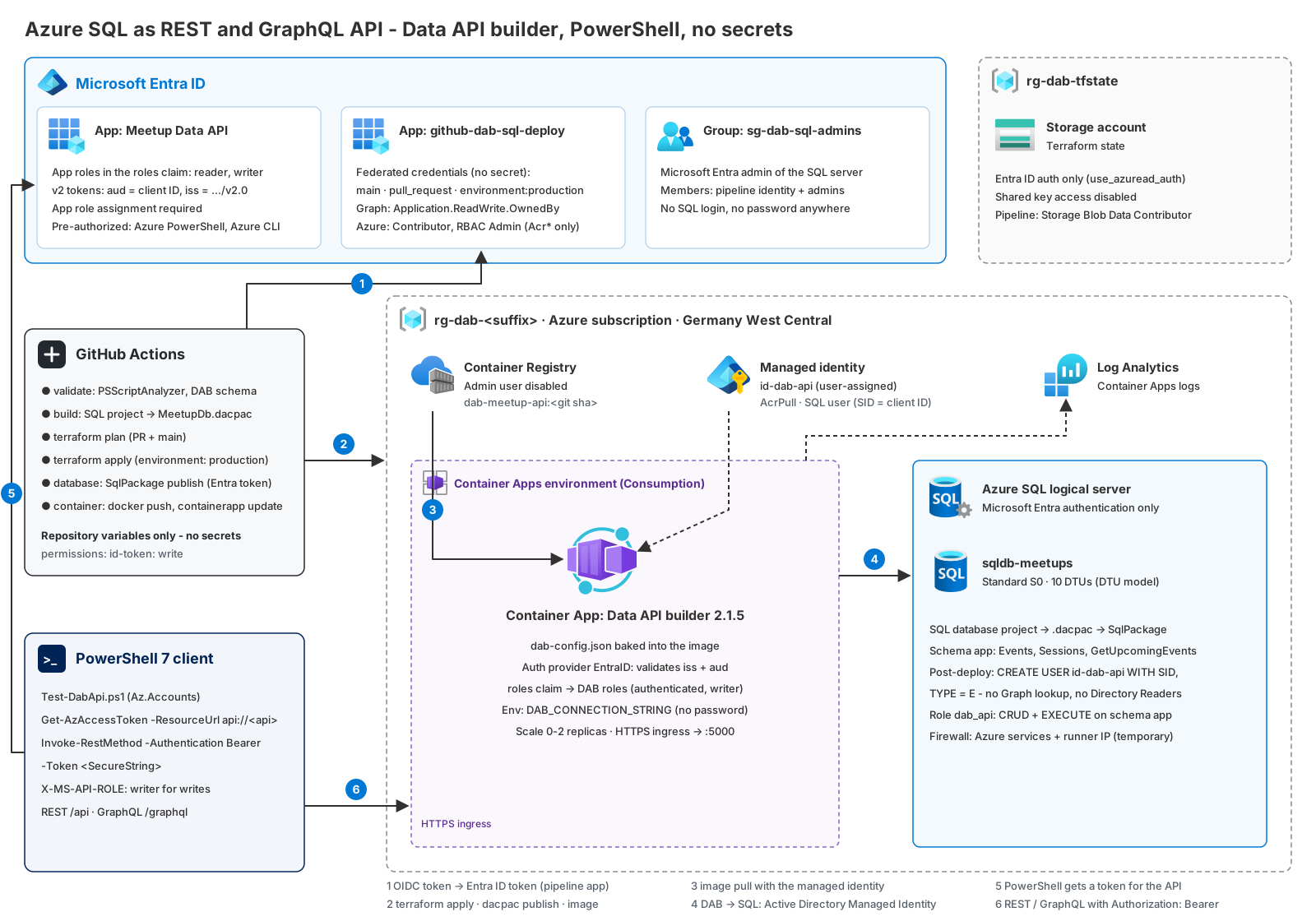
| # | Who | To what | How |
|---|---|---|---|
| 1 | GitHub Actions | Entra ID / Azure | Federated credential (OIDC) |
| 2 | GitHub Actions | Terraform state, ARM, Graph, ACR, SQL (SqlPackage) | The same token - Entra ID everywhere |
| 3 | Container App | Container Registry | User-assigned managed identity, AcrPull |
| 4 | Data API builder | Azure SQL | Same identity, Authentication=Active Directory Managed Identity |
| 5 | PowerShell | Entra ID | Get-AzAccessToken -ResourceUrl api://<API client ID> |
| 6 | PowerShell | Data API builder | Authorization: Bearer, app roles in the roles claim |
DAB runs in Azure Container Apps (Consumption, scales to zero). The database is an Azure SQL database in the DTU model.
The database as code: an SDK-style SQL database project
A small meetup planner. Two tables and one stored procedure in the schema app. The schema doesn’t live in a folder of numbered .sql scripts. It lives in a SQL database project - the SDK-style one, Microsoft.Build.Sql. That’s a normal .NET project:
1
2
3
4
5
6
7
8
9
10
11
12
13
14
15
16
17
18
19
20
21
22
23
24
25
26
27
28
29
<Project DefaultTargets="Build">
  <Sdk Name="Microsoft.Build.Sql" Version="2.3.0" />

  <PropertyGroup>
    <Name>MeetupDb</Name>
    <DSP>Microsoft.Data.Tools.Schema.Sql.SqlAzureV12DatabaseSchemaProvider</DSP>
    <ModelCollation>1033, CI</ModelCollation>
    <DefaultSchema>app</DefaultSchema>
    <RunSqlCodeAnalysis>True</RunSqlCodeAnalysis>
  </PropertyGroup>

  <ItemGroup>
    <Build Remove="Scripts\**\*.sql" />
    <None Include="Scripts\Seed.sql" />
    <None Include="Scripts\DabUser.sql" />
    <PostDeploy Include="Scripts\Script.PostDeployment.sql" />
  </ItemGroup>

  <ItemGroup>
    <SqlCmdVariable Include="DabIdentityName">
      <DefaultValue></DefaultValue>
      <Value>$(SqlCmdVar__1)</Value>
    </SqlCmdVariable>
    <SqlCmdVariable Include="DabIdentityClientId">
      <DefaultValue></DefaultValue>
      <Value>$(SqlCmdVar__2)</Value>
    </SqlCmdVariable>
  </ItemGroup>
</Project>
1
2
3
4
5
6
7
8
9
10
11
12
13
14
database/
├── MeetupDb.sqlproj
├── Security/
│   ├── app.sql                         # CREATE SCHEMA [app]
│   ├── dab_api.sql                     # CREATE ROLE [dab_api]
│   └── Permissions.sql                 # GRANT ... ON SCHEMA::[app] TO [dab_api]
├── app/
│   ├── Tables/Events.sql, Sessions.sql
│   ├── Indexes/IX_Sessions_EventId.sql
│   └── StoredProcedures/GetUpcomingEvents.sql
└── Scripts/
    ├── Script.PostDeployment.sql       # :r DabUser.sql, :r Seed.sql
    ├── DabUser.sql
    └── Seed.sql
Every file describes the desired state of one object. There is no ALTER TABLE anywhere:
1
2
3
4
5
6
7
8
9
10
11
12
13
14
CREATE TABLE [app].[Sessions]
(
    [SessionId]       INT           IDENTITY (1, 1) NOT NULL,
    [EventId]         INT           NOT NULL,
    [Title]           NVARCHAR(200) NOT NULL,
    [Speaker]         NVARCHAR(100) NOT NULL,
    [SpeakerEmail]    NVARCHAR(256) NULL,
    [Level]           SMALLINT      NOT NULL CONSTRAINT [DF_Sessions_Level] DEFAULT (200),
    [DurationMinutes] INT           NOT NULL CONSTRAINT [DF_Sessions_Duration] DEFAULT (45),
    CONSTRAINT [PK_Sessions] PRIMARY KEY CLUSTERED ([SessionId] ASC),
    CONSTRAINT [FK_Sessions_Events] FOREIGN KEY ([EventId]) REFERENCES [app].[Events] ([EventId]) ON DELETE CASCADE,
    CONSTRAINT [CK_Sessions_Level] CHECK ([Level] IN (100, 200, 300, 400)),
    CONSTRAINT [CK_Sessions_Duration] CHECK ([DurationMinutes] BETWEEN 5 AND 480)
);
app.GetUpcomingEvents @Days returns the events of the next N days with their number of sessions. SpeakerEmail is there on purpose. It shows field-level security later: readers don’t see it, writers do.
Why a project instead of scripts?
dotnet buildvalidates the model. Every object is checked against the Azure SQL Database model (SqlAzureV12). A stored procedure that references a column that doesn’t exist fails the build - in the pull request, not in production.RunSqlCodeAnalysisadds the static code analysis rules as build warnings.- The output is one artifact.
bin/Release/MeetupDb.dacpaccontains the model, the post-deployment script and the SQLCMD variable definitions. - SqlPackage computes the change. It compares the
.dacpacwith the target database and generates theALTERstatements itself.BlockOnPossibleDataLoss(on by default) stops a publish that would drop a column with data.
1
2
dotnet build ./database/MeetupDb.sqlproj --configuration Release
dotnet tool install --global microsoft.sqlpackage
The SDK needs .NET 8 or later. I build with the .NET 10 SDK and SqlPackage 170.5.96.
Two things that are not part of the model
The sample data. A .dacpac describes structure, not rows. Scripts/Seed.sql inserts five events and eight sessions - only when app.Events is empty, with dates relative to the deployment. So there are always upcoming events.
The database user of the DAB identity. Its SID depends on the environment - it comes from Terraform. So it can’t be a static object in the project. Scripts/DabUser.sql creates it from two SQLCMD variables, $(DabIdentityName) and $(DabIdentityClientId). The role and its permissions are model objects:
1
2
3
4
5
6
-- Security/dab_api.sql
CREATE ROLE [dab_api] AUTHORIZATION [dbo];

-- Security/Permissions.sql
GRANT SELECT, INSERT, UPDATE, DELETE, EXECUTE ON SCHEMA::[app] TO [dab_api];
GRANT VIEW DEFINITION ON SCHEMA::[app] TO [dab_api];   -- DAB reads table and key metadata at startup
The post-deployment script includes both files with :r and runs after every publish. Both are idempotent. The included files are excluded from the model build (<Build Remove="Scripts\**\*.sql" />) - otherwise the build would try to compile an INSERT as a schema object.
SqlPackage leaves the DAB user alone on the next publish, even though it isn’t in the model: DropObjectsNotInSource and DropRoleMembersNotInSource are False by default. I set the first one explicitly anyway - it’s the setting that would lock DAB out of the database.
Data API builder configuration
DAB 2.x is the current major version. I use 2.1.5. The whole API is one file, dab/dab-config.json. The parts that matter:
1
2
3
4
5
6
7
8
9
10
11
12
13
14
15
16
17
18
19
20
21
22
{
  "$schema": "https://github.com/Azure/data-api-builder/releases/download/v2.1.5/dab.draft.schema.json",
  "data-source": {
    "database-type": "mssql",
    "connection-string": "@env('DAB_CONNECTION_STRING')"
  },
  "runtime": {
    "mcp": { "enabled": false },
    "host": {
      "mode": "production",
      "authentication": {
        "provider": "EntraID",
        "jwt": {
          "audience": "@env('DAB_JWT_AUDIENCE')",
          "issuer": "@env('DAB_JWT_ISSUER')"
        }
      }
    },
    "pagination": { "default-page-size": 100, "max-page-size": 1000, "next-link-relative": true },
    "health": { "enabled": true, "roles": [ "authenticated" ] }
  }
}
A few decisions:
- Everything environment-specific comes from
@env(). The image is the same in every environment. And no value in it is confidential. EntraIDprovider. DAB validates the bearer token itself: signature,issandaud. No API Management, no EasyAuth in front of it.- MCP is off. DAB 2.x enables its MCP endpoint (
/mcp) by default. This sample is about REST and GraphQL from PowerShell, so I turn off what I don’t use. next-link-relative. Container Apps terminates TLS at the ingress. DAB only sees HTTP behind it. With relativenextLinkvalues the paging links can’t point tohttp://.health.roles. In production mode,/healthreturns403for everyone unless you name the roles. The root endpoint/stays anonymous - that’s what the container probes use.
The entities:
1
2
3
4
5
6
7
8
9
10
11
12
13
14
15
16
17
18
19
20
21
22
23
24
25
26
27
28
29
30
31
32
33
34
35
36
"Event": {
  "source": { "object": "app.Events", "type": "table" },
  "graphql": { "type": { "singular": "Event", "plural": "Events" } },
  "permissions": [
    { "role": "authenticated", "actions": [ "read" ] },
    { "role": "writer", "actions": [ "*" ] }
  ],
  "relationships": {
    "sessions": {
      "cardinality": "many",
      "target.entity": "Session",
      "source.fields": [ "EventId" ],
      "target.fields": [ "EventId" ]
    }
  }
},
"Session": {
  "source": { "object": "app.Sessions", "type": "table" },
  "permissions": [
    {
      "role": "authenticated",
      "actions": [ { "action": "read", "fields": { "include": [ "*" ], "exclude": [ "SpeakerEmail" ] } } ]
    },
    { "role": "writer", "actions": [ "*" ] }
  ]
},
"UpcomingEvents": {
  "source": {
    "object": "app.GetUpcomingEvents",
    "type": "stored-procedure",
    "parameters": [ { "name": "Days", "required": false, "default": 90 } ]
  },
  "graphql": { "operation": "query" },
  "rest": { "methods": [ "get" ] },
  "permissions": [ { "role": "authenticated", "actions": [ "execute" ] } ]
}
Note the parameters array. DAB 2.0 deprecated the old dictionary format ({ "Days": 90 }). It still works, but the array is the format going forward.
There is no anonymous role anywhere. Without a token, every entity returns 403.
How DAB picks the role of a request:
| Token | X-MS-API-ROLE header | Role |
|---|---|---|
| none | - | anonymous |
| valid | none | authenticated |
| valid | writer, and writer is in the roles claim | writer |
| valid | writer, but not in the roles claim | rejected (403) |
So a writer reads as authenticated and sends X-MS-API-ROLE: writer only when it writes. One more thing that changed in 2.0: role inheritance. A named role without its own permissions inherits from authenticated, which inherits from anonymous. dab configure --show-effective-permissions shows the result.
The pipeline validates the file against the official JSON schema before anything is deployed. PowerShell can do that on its own:
1
2
3
$schemaUrl = (Get-Content ./dab/dab-config.json -Raw | ConvertFrom-Json).'$schema'
Invoke-WebRequest -Uri $schemaUrl -OutFile "$env:RUNNER_TEMP/dab.schema.json"
Test-Json -Path ./dab/dab-config.json -SchemaFile "$env:RUNNER_TEMP/dab.schema.json"
The container
1
2
3
4
ARG DAB_VERSION=2.1.5
FROM mcr.microsoft.com/azure-databases/data-api-builder:${DAB_VERSION}

COPY dab-config.json /App/dab-config.json
That’s it. Microsoft’s own Container Apps guide does the same. Why not mount the config from Azure Files? Because an Azure Files volume in Container Apps needs the storage account key. A custom image in ACR needs none: Container Apps pulls it with the managed identity, the pipeline pushes it with its OIDC login.
I pin the DAB version instead of using latest. A new DAB version is a change I want to see in a pull request.
Authentication without a secret
GitHub Actions to Azure
Same pattern as in my previous posts. scripts/New-DabGitHubOidcIdentity.ps1 runs once, as an admin:
- App registration
github-dab-sql-deploywith federated credentials formain, pull requests and the environmentproduction. - Contributor on the subscription and Role Based Access Control Administrator with a condition: the pipeline may only assign
AcrPullandAcrPush. - Microsoft Graph
Application.ReadWrite.OwnedBy- more on that below. - A storage account for the Terraform state. Shared key access is disabled; Terraform uses Entra ID (
use_azuread_auth). - The group
sg-dab-sql-adminswith the pipeline identity and you as members. It becomes the SQL server’s Entra admin.
With -ConfigureGitHub it writes the IDs as repository variables and creates the environment. There is nothing to put into GitHub secrets.
1
2
3
4
5
6
7
8
Connect-AzAccount -Tenant $tenantId -Subscription $subscriptionId
$bootstrap = @{
    GitHubOrganization = 'constantinhager'
    GitHubRepository   = 'BlogAssets'
    ConfigureGitHub    = $true
    ResolveGitHubId    = $true
}
./scripts/New-DabGitHubOidcIdentity.ps1 @bootstrap
The script calls Microsoft Graph with plain REST and a token from Az.Accounts. With Az.Accounts 5 and later, Get-AzAccessToken always returns the token as SecureString, and Invoke-RestMethod takes it directly:
1
2
3
4
5
6
7
8
$request = @{
    Method         = $Method
    Uri            = "https://graph.microsoft.com/v1.0/$Path"
    Authentication = 'Bearer'
    Token          = (Get-AzAccessToken -ResourceTypeName MSGraph).Token
    ContentType    = 'application/json'
}
Invoke-RestMethod @request
The token never shows up as plain text.
Data API builder to Azure SQL
The connection string, built by Terraform:
1
2
3
Server=tcp:sql-dab-ab12c.database.windows.net,1433;Database=sqldb-meetups;
Authentication=Active Directory Managed Identity;User Id=<client ID of id-dab-api>;
Encrypt=True;TrustServerCertificate=False;Connect Timeout=30
Active Directory Managed Identity tells Microsoft.Data.SqlClient to get a token from the managed identity endpoint. User Id selects the user-assigned identity by its client ID. No password, so the connection string is a normal environment variable - not even a Container Apps secret.
The identity also needs a user in the database. The usual way is this:
1
CREATE USER [id-dab-api-ab12c] FROM EXTERNAL PROVIDER;
FROM EXTERNAL PROVIDER looks the name up in Entra ID. When a service principal runs it - our pipeline - the SQL server needs its own identity with Graph read permissions or the Directory Readers role. Granting that is a Privileged Role Administrator task, per server.
I skip the lookup. CREATE USER ... WITH SID ... TYPE = E creates the user directly. For service principals and managed identities, the SID is the client ID as binary(16). From Scripts/DabUser.sql:
1
2
3
4
5
6
7
8
9
10
11
DECLARE @name SYSNAME = N'$(DabIdentityName)';
DECLARE @clientId UNIQUEIDENTIFIER = '$(DabIdentityClientId)';
DECLARE @sid VARBINARY(16) = CONVERT(VARBINARY(16), @clientId);

IF NOT EXISTS (SELECT 1 FROM sys.database_principals WHERE name = @name)
BEGIN
    DECLARE @cmd NVARCHAR(MAX) =
        N'CREATE USER ' + QUOTENAME(@name) +
        N' WITH SID = ' + CONVERT(NVARCHAR(34), @sid, 1) + N', TYPE = E;';
    EXEC (@cmd);
END;
The server has no managed identity and no directory role. The price: SQL doesn’t check the ID. A wrong client ID creates a user nobody can sign in as. So the value comes straight from the Terraform output, never from typing. And if a user with that name exists with a different SID - the identity was recreated - the script stops instead of keeping the old one:
1
2
ELSE IF @existingSid <> @sid OR @existingType <> 'E'
    THROW 50002, @msg, 1;
The same script adds the user to the role dab_api from the project. The user gets exactly what the API exposes - CRUD and EXECUTE on the schema app. No db_owner, no db_datareader on the whole database.
PowerShell to Data API builder
DAB needs something to validate tokens against: an app registration for the API. Terraform creates it:
1
2
3
4
5
6
7
8
9
10
11
12
13
14
15
16
17
18
19
20
21
22
23
24
25
26
27
28
29
30
31
32
33
34
35
36
resource "azuread_application" "api" {
  display_name     = "${var.api_display_name} (${local.suffix})"
  sign_in_audience = "AzureADMyOrg"
  owners           = [data.azuread_client_config.current.object_id]

  api {
    requested_access_token_version = 2

    oauth2_permission_scope {
      id    = random_uuid.scope_access.result
      value = "Data.Access"
      type  = "User"
      # ...
    }
  }

  app_role {
    id                   = random_uuid.role_reader.result
    value                = "reader"
    allowed_member_types = ["User", "Application"]
    # ...
  }

  app_role {
    id                   = random_uuid.role_writer.result
    value                = "writer"
    allowed_member_types = ["User", "Application"]
    # ...
  }
}

resource "azuread_service_principal" "api" {
  client_id                    = azuread_application.api.client_id
  owners                       = [data.azuread_client_config.current.object_id]
  app_role_assignment_required = true
}
Four details took me longer than they should have:
1. requested_access_token_version = 2. The default is null, which means v1 tokens. A v1 token has iss = https://sts.windows.net/<tenant>/. DAB expects the v2 issuer https://login.microsoftonline.com/<tenant>/v2.0. Every request fails with 401.
2. The audience is the client ID. In a v2 token, aud is always the API’s client ID - a GUID - even if you request the token for api://<client ID>. Several examples set jwt.audience to api://.... That doesn’t match a v2 token. So Terraform sets DAB_JWT_AUDIENCE to the client ID:
1
2
3
4
5
6
7
8
9
env {
  name  = "DAB_JWT_AUDIENCE"
  value = azuread_application.api.client_id
}

env {
  name  = "DAB_JWT_ISSUER"
  value = "https://login.microsoftonline.com/${local.tenant_id}/v2.0"
}
3. Assignment required. Without it, every user in the tenant gets a token for the API and is authenticated in DAB. With app_role_assignment_required = true, Entra ID only issues a token to users, groups and apps with an app role assignment. reader is the door opener. writer additionally appears in the roles claim and unlocks the DAB role writer.
4. Pre-authorize Azure PowerShell. Get-AzAccessToken uses the first-party app Microsoft Azure PowerShell (1950a258-227b-4e31-a9cf-717495945fc2). Without consent for your API, the token request fails with AADSTS65001. Pre-authorizing the client for the scope removes the consent prompt. I do the same for the Azure CLI (04b07795-8ddb-461a-bbee-02f9e1bf7b46):
1
2
3
4
5
resource "azuread_application_pre_authorized" "azure_powershell" {
  application_id       = azuread_application.api.id
  authorized_client_id = "1950a258-227b-4e31-a9cf-717495945fc2"
  permission_ids       = [random_uuid.scope_access.result]
}
The identifier URI api://<client ID> contains the app’s own client ID. So it can’t be set in the same resource. azuread_application_identifier_uri sets it afterwards, and the application ignores changes to identifier_uris.
Why Application.ReadWrite.OwnedBy - and not more
Creating an app registration from a pipeline needs a Graph permission. Application.ReadWrite.All would let the pipeline change every app in the tenant - including adding a secret to an app with more privileges than itself. Application.ReadWrite.OwnedBy only covers applications the pipeline owns. An app it creates gets the pipeline as owner automatically, and Terraform lists it in owners for the app and the service principal.
Assigning users to app roles is a different permission: AppRoleAssignment.ReadWrite.All. That one lets an app grant any app role - including Microsoft Graph application permissions to itself. The pipeline doesn’t get it. scripts/Grant-DabApiRole.ps1 does the assignment, run by an admin:
1
2
$api = terraform -chdir=infra output -raw api_client_id
./scripts/Grant-DabApiRole.ps1 -ApiClientId $api -Role writer -UserPrincipalName 'constantin@contoso.com'
It also takes -GroupObjectId (needs Entra ID P1) and -ServicePrincipalObjectId - for a managed identity or an automation account that calls the API with an app-only token.
Terraform
infra/ deploys:
- a resource group and a Log Analytics workspace
- the user-assigned managed identity
id-dab-api-<suffix> - Azure Container Registry (Basic, admin user disabled) with
AcrPullfor the identity andAcrPushfor the pipeline - the Azure SQL server (Entra-only, admin = the group) and the database
sqldb-meetups(S0) - the Container Apps environment and the container app
- the API app registration, its service principal and the two pre-authorizations
The providers are azurerm 5.x and azuread 3.x. Two azurerm 5 changes I ran into:
1
2
3
4
5
6
7
8
9
10
11
12
13
14
15
16
17
18
provider "azurerm" {
  features {}

  # 5.x registers no resource providers by default.
  resource_providers_to_register = [
    "Microsoft.App",
    "Microsoft.ContainerRegistry",
    "Microsoft.ManagedIdentity",
    "Microsoft.OperationalInsights",
    "Microsoft.Sql",
  ]
}

resource "azurerm_container_app_environment" "this" {
  # ...
  logs_destination           = "log-analytics"   # 5.x: required to use log_analytics_workspace_id
  log_analytics_workspace_id = azurerm_log_analytics_workspace.this.id
}
The SQL server:
1
2
3
4
5
6
7
8
9
10
11
12
13
resource "azurerm_mssql_server" "this" {
  name                = local.names.sql_server
  version             = "12.0"
  minimum_tls_version = "1.2"
  # ...

  azuread_administrator {
    login_username              = var.sql_admin_group_name
    object_id                   = var.sql_admin_group_object_id
    tenant_id                   = local.tenant_id
    azuread_authentication_only = true
  }
}
No administrator_login, no administrator_login_password. With azuread_authentication_only = true both can be omitted.
The database is S0 - DTU model, Standard tier, 10 DTUs:
1
2
3
4
5
6
7
8
resource "azurerm_mssql_database" "this" {
  name                 = local.names.database
  server_id            = azurerm_mssql_server.this.id
  sku_name             = var.sql_sku_name   # "S0"
  max_size_gb          = var.sql_max_size_gb # 2 - S0 allows up to 250 GB
  storage_account_type = "Local"
  tags                 = var.tags
}
The split is clear: Terraform owns the database (SKU, size, backup redundancy). The SQL project owns the schema. That’s why the publish runs with /p:ScriptDatabaseOptions=False - SqlPackage must not touch database settings that Terraform manages. A .dacpac can also carry a service objective; this one doesn’t, so a publish never changes the SKU.
The chicken and the egg
The container app needs an image. The image needs a registry. The registry comes from the same Terraform run. On the first run there is nothing to pull.
I solved it with a bootstrap image and ignore_changes:
1
2
3
4
5
6
7
8
9
10
11
12
13
14
15
16
17
18
19
20
21
22
23
24
25
26
27
28
29
30
31
32
33
resource "azurerm_container_app" "dab" {
  # ...
  template {
    min_replicas = 0
    max_replicas = 2

    container {
      name   = "dab"
      image  = var.bootstrap_image   # mcr.microsoft.com/dotnet/samples:aspnetapp
      cpu    = 0.5
      memory = "1Gi"

      env {
        name  = "ASPNETCORE_HTTP_PORTS"
        value = "5000"
      }
      # DAB_CONNECTION_STRING, DAB_JWT_AUDIENCE, DAB_JWT_ISSUER ...

      startup_probe {
        transport               = "HTTP"
        port                    = 5000
        path                    = "/"
        interval_seconds        = 10
        timeout                 = 5
        failure_count_threshold = 30
      }
    }
  }

  lifecycle {
    ignore_changes = [template[0].container[0].image]
  }
}
Terraform owns everything except the image. The pipeline sets the image with az containerapp update --image. ASPNETCORE_HTTP_PORTS=5000 makes the ASP.NET sample image and DAB listen on the same port, so the ingress and the probes fit both.
The startup probe allows five minutes. DAB reads the database metadata before it answers on /.
GitHub Actions
.github/workflows/data-api-builder.yml:
| Job | Runs on | What |
|---|---|---|
validate | PR + main | PSScriptAnalyzer, dab-config.json against the DAB schema |
build-database | PR + main | dotnet build of the SQL project -> MeetupDb.dacpac (artifact) |
terraform-plan | PR + main | init, fmt -check, validate, plan -out tfplan |
terraform-apply | main, environment production | applies exactly the reviewed plan, exports the outputs |
database | main, environment production | SqlPackage, temporary firewall rule, deploy report, publish |
container | main, environment production | docker build + push, az containerapp update, smoke test |
terraform-apply waits for build-database. A schema that doesn’t build stops the deployment before anything in Azure changes.
The plan file and the .dacpac go from one job to the next as artifacts. That’s only OK because they contain nothing secret - there is no password in this project that could end up in them.
The database job needs network access to Azure SQL. GitHub-hosted runners have changing IPs. So the job opens the firewall for its own IP and closes it again, also when the deployment fails:
1
2
3
4
5
6
7
8
9
10
11
12
13
14
15
16
- name: Open the SQL firewall for this runner
  run: |
    $ip = (Invoke-RestMethod -Uri 'https://api.ipify.org?format=json').ip
    az sql server firewall-rule create --resource-group $env:RESOURCE_GROUP --server $env:SQL_SERVER `
        --name $env:RULE_NAME --start-ip-address $ip --end-ip-address $ip --output none

- name: Publish the dacpac (schema, DAB user, sample data)
  run: |
    # First the report of what will change (in the log), then the publish.
    ./scripts/Publish-DabDatabase.ps1 @db -Action DeployReport -OutputPath $env:RUNNER_TEMP
    Get-Content "$env:RUNNER_TEMP/$($db.DatabaseName).deployreport.xml"
    ./scripts/Publish-DabDatabase.ps1 @db

- name: Close the SQL firewall
  if: always()
  run: az sql server firewall-rule delete --resource-group $env:RESOURCE_GROUP --server $env:SQL_SERVER --name $env:RULE_NAME
Before that, the job downloads the .dacpac artifact and installs SqlPackage as a .NET tool:
1
2
3
4
- name: Install SqlPackage
  run: |
    dotnet tool install --global microsoft.sqlpackage --version $env:SQLPACKAGE_VERSION
    Join-Path $HOME '.dotnet/tools' >> $env:GITHUB_PATH
Publish-DabDatabase.ps1 gets an Entra ID token for https://database.windows.net/ - from the Azure CLI session that azure/login created - and hands it to SqlPackage with /AccessToken. No connection string with credentials, no SQL login. The pipeline identity is a member of sg-dab-sql-admins, so it is admin in the database:
1
2
3
4
5
6
7
8
9
10
11
12
$arguments = @(
    "/Action:$Action"                                    # Publish, Script or DeployReport
    "/SourceFile:$DacpacPath"
    "/TargetServerName:$ServerName"
    "/TargetDatabaseName:$DatabaseName"
    "/Variables:DabIdentityName=$DabIdentityName"
    "/Variables:DabIdentityClientId=$DabIdentityClientId"
    '/p:ScriptDatabaseOptions=False'                     # Terraform owns the database settings
    '/p:BlockOnPossibleDataLoss=True'
    '/p:DropObjectsNotInSource=False'                    # keep the DAB user
)
& sqlpackage @arguments "/AccessToken:$(ConvertFrom-SecureString -SecureString $AccessToken -AsPlainText)"
The token stays a SecureString until the moment it becomes a SqlPackage argument. It never lands in a variable that gets logged.
A new firewall rule takes a few seconds to become active. So the script retries - but only on connection errors (40615, Unable to connect, …). A schema error fails right away.
-Action DeployReport writes an XML report of what the publish would change. The job prints it before the real publish, so the log shows every ALTER. Locally, -Action Script gives you the complete T-SQL to review.
The container job pushes the image without a registry password. az acr login exchanges the OIDC login for a registry token:
1
2
3
4
az acr login --name $acrName
docker build --pull --tag $env:IMAGE ./dab
docker push $env:IMAGE
az containerapp update --name $appName --resource-group $rg --image $env:IMAGE
The smoke test waits until / returns DAB’s version - until then the bootstrap image may still answer. Then it checks the one thing that must never work: data without a token.
1
2
$null = Invoke-RestMethod -Uri "$env:API_URL/api/Event" -SkipHttpErrorCheck -StatusCodeVariable status
if ($status -notin 401, 403) { throw "Anonymous access returned $status." }
The PowerShell client
This is the part the whole setup is for. scripts/Test-DabApi.ps1 needs nothing but PowerShell 7.4 and Az.Accounts.
Getting the token
1
2
Connect-AzAccount -Tenant $tenantId
$token = (Get-AzAccessToken -ResourceUrl "api://$ApiClientId").Token   # SecureString
When something doesn’t work, the claims tell you why. The script decodes them (no validation - that’s DAB’s job):
1
2
3
4
5
6
function ConvertFrom-Jwt {
    param([Parameter(Mandatory)][securestring] $Token)
    $payload = (ConvertFrom-SecureString -SecureString $Token -AsPlainText).Split('.')[1].Replace('-', '+').Replace('_', '/')
    $payload = $payload.PadRight($payload.Length + (4 - $payload.Length % 4) % 4, '=')
    [Text.Encoding]::UTF8.GetString([Convert]::FromBase64String($payload)) | ConvertFrom-Json
}
1
2
3
4
5
aud   : 6f2c9e1a-...        <- the API's client ID, not api://...
iss   : https://login.microsoftonline.com/<tenant>/v2.0
ver   : 2.0
scp   : Data.Access
roles : writer
ver must be 2.0. And roles must contain writer before you try to write. Roles are written into the token when Entra ID issues it. Get-AzAccessToken returns a cached token until it expires, so after Grant-DabApiRole.ps1 run Connect-AzAccount again (or wait about an hour).
One wrapper for every call
1
2
3
4
5
6
7
8
9
10
11
12
13
14
15
16
17
18
19
20
21
22
23
24
25
26
27
28
29
30
31
function Invoke-Dab {
    param(
        [Parameter(Mandatory)][string] $Path,
        [ValidateSet('GET', 'POST', 'PUT', 'PATCH', 'DELETE')][string] $Method = 'GET',
        [object] $Body,
        [string] $Role,
        [switch] $Anonymous,
        [int[]] $ExpectStatus
    )
    $request = @{
        Uri         = [uri]::new($ApiUrl, $Path)
        Method      = $Method
        ContentType = 'application/json'
        Headers     = @{}
    }
    if (-not $Anonymous) {
        $request.Authentication = 'Bearer'
        $request.Token = $script:token
    }
    if ($Role) { $request.Headers['X-MS-API-ROLE'] = $Role }
    if ($PSBoundParameters.ContainsKey('Body')) { $request.Body = $Body | ConvertTo-Json -Depth 10 -Compress }

    if ($ExpectStatus) {
        $null = Invoke-RestMethod @request -SkipHttpErrorCheck -StatusCodeVariable status
        if ($status -notin $ExpectStatus) { throw "$Method $Path returned $status, expected $($ExpectStatus -join ' or ')." }
        return $status
    }

    # The container scales to zero: the first call after a quiet period waits for a cold start.
    Invoke-RestMethod @request -MaximumRetryCount 4 -RetryIntervalSec 10
}
-Authentication Bearer -Token takes the SecureString as it comes from Get-AzAccessToken. No "Bearer $plainText" header string anywhere.
REST
DAB speaks a subset of OData in the query string. $select, $filter, $orderby and $first:
1
Invoke-Dab -Path '/api/Event?$select=EventId,Title,EventDate,IsOnline&$orderby=EventDate&$first=2'
This has to be in single quotes. In double quotes, PowerShell would expand $select and $first as variables.
With $first=2, the response has a nextLink when more rows exist. A small loop reads all pages:
1
2
3
4
5
6
7
8
9
10
11
function Get-DabPage {
    param([Parameter(Mandatory)][string] $Path)
    while ($Path) {
        $page = Invoke-Dab -Path $Path
        $page.value
        $Path = $page.nextLink
    }
}

Get-DabPage -Path '/api/Event?$select=EventId,Title,EventDate,IsOnline&$orderby=EventDate&$first=2' |
    Format-Table EventId, Title, EventDate, IsOnline
1
2
3
4
5
6
7
EventId Title                                   EventDate           IsOnline
------- -----                                   ---------           --------
      1 PowerShell Meetup - Secretless Azure    01.10.2026 18:00:00    False
      2 PowerShell Meetup - Data APIs           13.11.2026 18:00:00    False
      3 Online Session - Terraform and OIDC     27.11.2026 18:00:00     True
      4 PowerShell Meetup - Dev Containers      25.12.2026 18:00:00    False
      5 Online Session - Entra ID for Scripters 27.02.2027 18:00:00     True
Filters with spaces go through [uri]::EscapeDataString:
1
2
$filter = [uri]::EscapeDataString('IsOnline eq true')
(Invoke-Dab -Path "/api/Event?`$filter=$filter").value
One row by primary key, and the stored procedure - parameters are query string values for GET:
1
2
(Invoke-Dab -Path '/api/Event/EventId/2').value
(Invoke-Dab -Path '/api/UpcomingEvents?Days=60').value | Format-Table EventId, Title, EventDate, SessionCount
Field-level security in action - as authenticated, the response has no SpeakerEmail property at all:
1
2
$sessions = (Invoke-Dab -Path "/api/Session?`$filter=$([uri]::EscapeDataString('EventId eq 2'))").value
$sessions[0].PSObject.Properties.Name -contains 'SpeakerEmail'   # False
GraphQL
Same token, one endpoint. GraphQL shines with the relationship: events and their sessions in one request.
1
2
3
4
5
6
7
8
9
10
11
12
13
14
15
16
17
18
19
20
21
22
function Invoke-DabGraphQL {
    param([Parameter(Mandatory)][string] $Query, [hashtable] $Variables = @{}, [string] $Role)
    $result = Invoke-Dab -Path '/graphql' -Method POST -Role $Role -Body @{ query = $Query; variables = $Variables }
    if ($result.errors) { throw ($result.errors.message -join '; ') }
    $result.data
}

$query = @'
query ($first: Int) {
  events(first: $first, orderBy: { EventDate: ASC }, filter: { IsOnline: { eq: false } }) {
    items {
      EventId
      Title
      EventDate
      sessions {
        items { Title Speaker Level DurationMinutes }
      }
    }
  }
}
'@
(Invoke-DabGraphQL -Query $query -Variables @{ first = 10 }).events.items
GraphQL returns 200 even when the query fails. The errors are in the body - hence the check in the wrapper. A single-quoted here-string keeps PowerShell away from $first.
The stored procedure becomes executeUpcomingEvents:
1
(Invoke-DabGraphQL -Query 'query { executeUpcomingEvents(Days: 30) { Title SessionCount } }').executeUpcomingEvents
Writing
Without the role header, a write is 403 - even with the writer role in the token. The script checks that first:
1
2
3
4
5
6
7
8
9
$newSession = @{
    EventId         = $eventId
    Title           = 'Demo session from Test-DabApi.ps1'
    Speaker         = 'Test Script'
    SpeakerEmail    = 'test@example.com'
    Level           = 100
    DurationMinutes = 15
}
Invoke-Dab -Path '/api/Session' -Method POST -Body $newSession -ExpectStatus 403
Then as writer: create, change, delete.
1
2
3
4
5
6
7
8
9
10
11
12
13
14
15
$created = (Invoke-Dab -Path '/api/Session' -Method POST -Role writer -Body $newSession).value[0]

Invoke-Dab -Path "/api/Session/SessionId/$($created.SessionId)" -Method PATCH -Role writer -Body @{ DurationMinutes = 20 }

$mutation = @'
mutation ($id: Int!, $item: UpdateSessionInput!) {
  updateSession(SessionId: $id, item: $item) { SessionId Title }
}
'@
Invoke-DabGraphQL -Role writer -Query $mutation -Variables @{
    id   = $created.SessionId
    item = @{ Title = 'Demo session (renamed via GraphQL)' }
}

Invoke-Dab -Path "/api/Session/SessionId/$($created.SessionId)" -Method DELETE -Role writer -ExpectStatus 204
request-body-strict is on (the default). A property that doesn’t exist in the table returns 400 instead of being ignored silently. And the identity column SessionId doesn’t belong in the POST body - the database generates it.
Run it all:
1
2
3
4
5
$test = @{
    ApiUrl      = <The url from azure container apps>
    ApiClientId = <The client ID of the Entra ID app registration (Meetup Data Api)>
}
./scripts/Test-DabApi.ps1 @test -IncludeWrite
Rollout
- Bootstrap:
New-DabGitHubOidcIdentity.ps1 -ConfigureGitHub -ResolveGitHubId(once, as admin). - Push to
main. The pipeline builds the.dacpac, runs plan and apply, publishes the database and deploys the container. - Give yourself access:
Grant-DabApiRole.ps1 -Role writer -UserPrincipalName ...(as admin). Connect-AzAccount- a fresh sign-in, so the token contains the role.Test-DabApi.ps1 -IncludeWrite.
To work with the database by hand, add your IP to the SQL firewall and sign in with your Entra account - you are in sg-dab-sql-admins. dotnet build and Publish-DabDatabase.ps1 work locally too.
Things to watch out for
- v1 vs. v2 tokens. The most common
401.requested_access_token_version = 2on the API, and the audience is the client ID, notapi://.... - New app roles need a new token.
Get-AzAccessTokenreturns a cached token until it expires. Sign in again after an assignment. - “Allow Azure services” is broad. The firewall rule
0.0.0.0lets every Azure resource - in any tenant - reach the server’s network endpoint. Authentication still requires an Entra ID principal of your tenant, and there is no password to guess. For production, use a VNet-integrated Container Apps environment, a private endpoint for SQL andpublic_network_access_enabled = false. Then the database job needs a self-hosted runner in that network. - The SID must be the client ID. Not the principal (object) ID. SQL doesn’t validate it - a wrong value creates a user nobody can sign in as. Recreating the managed identity gives it a new client ID; the deployment script detects the mismatch and stops.
- Group admins and implicit users. Azure SQL doesn’t create a database user for someone who signs in through group membership. Statements that need a default schema can fail for them. The scripts always name the schema (
app.Events), so they don’t depend on one. - Cold starts. Scale to zero means the first request after a quiet period waits for the container. That’s what the startup probe and the retries in the client are for. Set
min_replicas = 1if you can’t wait - and pay for it. - S0 is small. 10 DTUs are plenty for a sample and a few scripts. Some features need more: columnstore indexes, for example, start at S3. The build targets Azure SQL Database in general and doesn’t know your SKU - such an error only shows up at publish.
- Drift. A change made by hand in the database is overwritten - or blocked by
BlockOnPossibleDataLoss- on the next publish. Make every schema change in the project.sqlpackage /Action:DeployReportagainst production shows drift before it surprises you. - Post-deployment scripts run every time. Everything in
Scripts/must be idempotent. They aren’t validated by the build either - test them against a real database. - MCP is on by default in DAB 2.x. If you don’t need
/mcp, turn it off. If you do, it uses the same roles and permissions. - Assignment required means: assignment required. Also for app-only callers. A managed identity that calls the API needs
Grant-DabApiRole.ps1 -ServicePrincipalObjectId. - Group assignments need Entra ID P1. Without it, assign users directly.
- The pipeline is powerful. Contributor on the subscription and
Application.ReadWrite.OwnedBy. The RBAC condition limits role assignments toAcrPullandAcrPush, and OwnedBy limits Graph to its own apps. Protect theproductionenvironment with required reviewers. - Pin the DAB version. 2.0 brought role inheritance, a new default auth provider (
Unauthenticated) for new configs and a newparametersformat. Read the release notes before you bumpDAB_VERSION.
Cleaning up
terraform destroy removes the Azure resources and the API app registration. scripts/Remove-DabDeployment.ps1 removes the rest - the pipeline identity with its role assignments, the SQL admin group, the Terraform state and the GitHub variables. Every step asks before it deletes, and -WhatIf shows the plan:
1
2
3
4
5
6
7
8
9
10
$remove = @{
    ResourceGroupName      = 'rg-dab-ab12c'
    ApiClientId            = $apiClientId
    RemovePipelineIdentity = $true
    RemoveSqlAdminGroup    = $true
    RemoveTerraformState   = $true
    GitHubOrganization     = 'constantinhager'
    GitHubRepository       = 'BlogAssets'
}
./scripts/Remove-DabDeployment.ps1 @remove -WhatIf
Conclusion
Data API builder replaces a lot of glue code. One JSON file instead of a custom API. Roles and field-level permissions instead of GRANT lists per script. REST and GraphQL from the same configuration.
From PowerShell, it’s Get-AzAccessToken and Invoke-RestMethod. No SQL client module, no port 1433, no connection string on the client.
The database behind it is code too. The SQL project is built and validated like any other .NET project, and SqlPackage rolls out only the difference - with the same Entra ID token as everything else.
And end to end there is no secret to rotate. The pipeline uses OIDC, DAB uses a managed identity, the database knows only Entra ID principals and the client uses its own sign-in. The one thing to keep an eye on is the network - and that’s the topic for the private endpoint version.
That’s it for this blog post.