Dev Containers for PowerShell, Part 2: Build Your Own DevOps Image
Series table of contents:
In this part I build my own image for DevOps work: PowerShell, Terraform, TFLint, Ansible, Azure CLI, kubectl, Helm and the GitHub CLI are baked in. GitHub Actions builds the image, tests it and pushes it to my own Azure Container Registry. The registry itself is deployed with Terraform - in the same workflow, before the image. Both jobs sign in to Azure with a federated credential. There is no secret in GitHub.
At the end the devcontainer.json is short. It mainly points to the image.
The complete source code is on GitHub: BlogAssets / Dev Containers Part 2 Build Your Own Image.
What’s in the image
| Tool | Version | Why |
|---|---|---|
| Base image | base:3-noble | Ubuntu 24.04, user vscode, Git, zsh |
| PowerShell | 7.6.7 | The current LTS |
| Terraform | 1.16.6 | Infrastructure as code |
| TFLint | 0.64.0 | Linter for Terraform |
| Azure CLI | 2.91.0 | az for everybody who prefers it |
| Ansible | 14.5.0 (ansible-core 2.21.5) | Configuration management |
| ansible-lint | 26.10.1 | Linter for Ansible playbooks |
| kubectl | 1.37.1 | Kubernetes |
| Helm | 4.3.1 | Kubernetes packages |
| GitHub CLI | 2.102.0 | Pull requests, workflow runs, secrets |
The base image is mcr.microsoft.com/devcontainers/base:3-noble. PowerShell 7.4 and 7.5 reach end of support on 10 November 2026, so the image uses 7.6.
The PowerShell modules:
| Module | Version | Why |
|---|---|---|
| Pester | 5.7.1 | Tests |
| PSScriptAnalyzer | 1.24.0 | Linter for PowerShell |
| PSFramework | latest | Logging and configuration |
| powershell-yaml | latest | Read and write YAML |
| Az.Accounts | latest | Sign in to Azure |
| Az.Resources | latest | Resource groups, role assignments |
| Az.ContainerRegistry | latest | Connect-AzContainerRegistry |
| Microsoft.Graph.Authentication | latest | Sign in to Microsoft Graph |
Modules without a pinned version get the newest version at build time - the image tag freezes it.
Every tool version is written down exactly once: as an ARG in the Dockerfile. The module versions live in image/scripts/install-modules.ps1.
Why base and not the .NET image from Part 1? The .NET image decides the PowerShell version for you, and it carries the full .NET SDK. Here I want a specific PowerShell version and a smaller image. If you write binary modules in C#, stay with the .NET image as the base - the rest of this post works the same way.
How it fits together
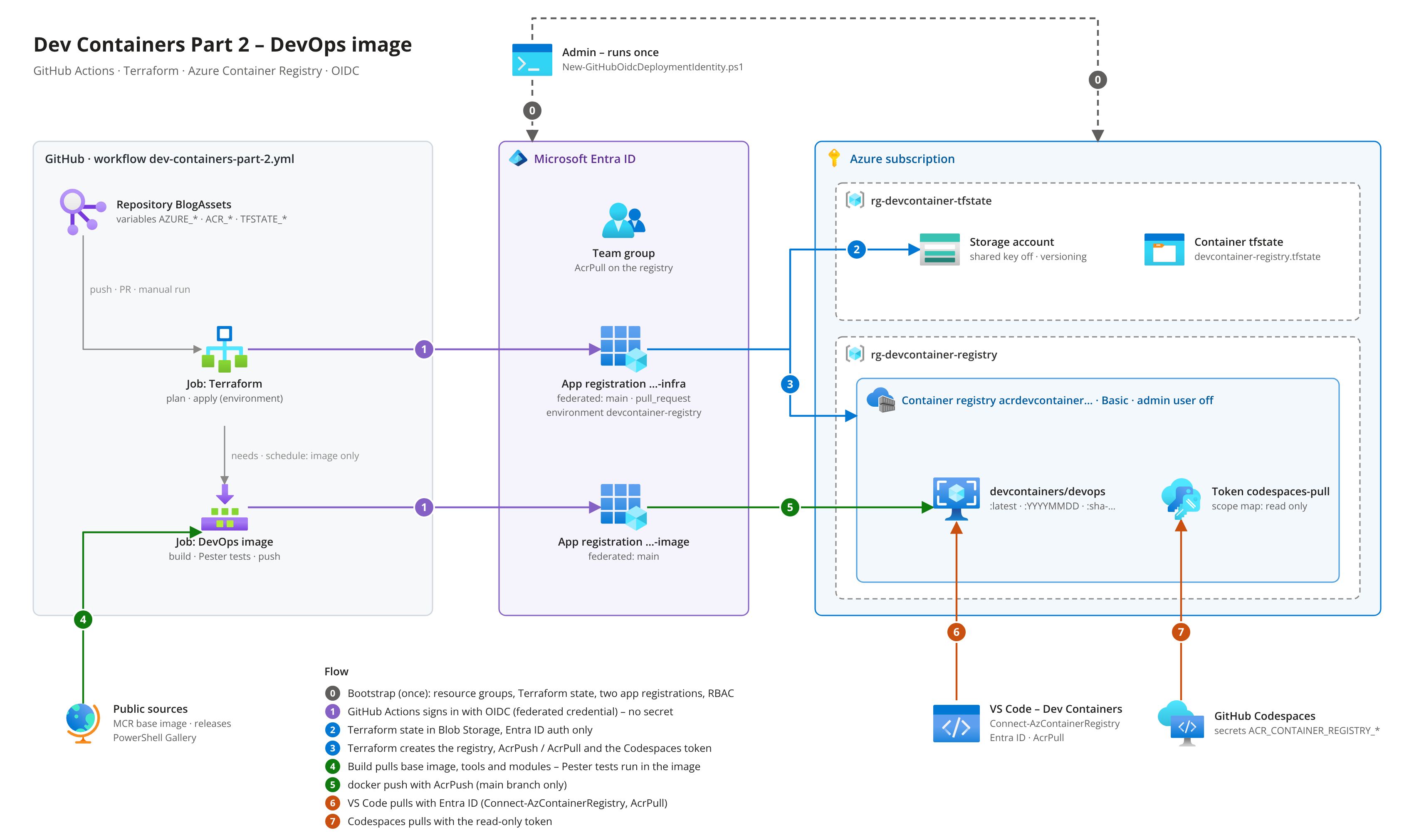
The numbers in the picture are the order in which things happen:
| Step | What happens |
|---|---|
| 0 | The bootstrap script runs once, as admin: resource groups, Terraform state, two app registrations with federated credentials, role assignments. |
| 1 | The Terraform job and the image job sign in to Azure with OIDC. Entra ID trusts the GitHub token through the federated credential. No secret. |
| 2 | Terraform keeps its state in a blob container - Entra ID auth only, no storage key. |
| 3 | Terraform creates the registry, the AcrPush and AcrPull assignments and the Codespaces token. |
| 4 | The image build pulls the base image, the tools and the modules. Pester tests run inside the image. |
| 5 | Only then the image is pushed - with AcrPush, from the main branch. |
| 6 | VS Code pulls the image with your Entra ID account (Connect-AzContainerRegistry, AcrPull). |
| 7 | GitHub Codespaces pulls it with the read-only token. |
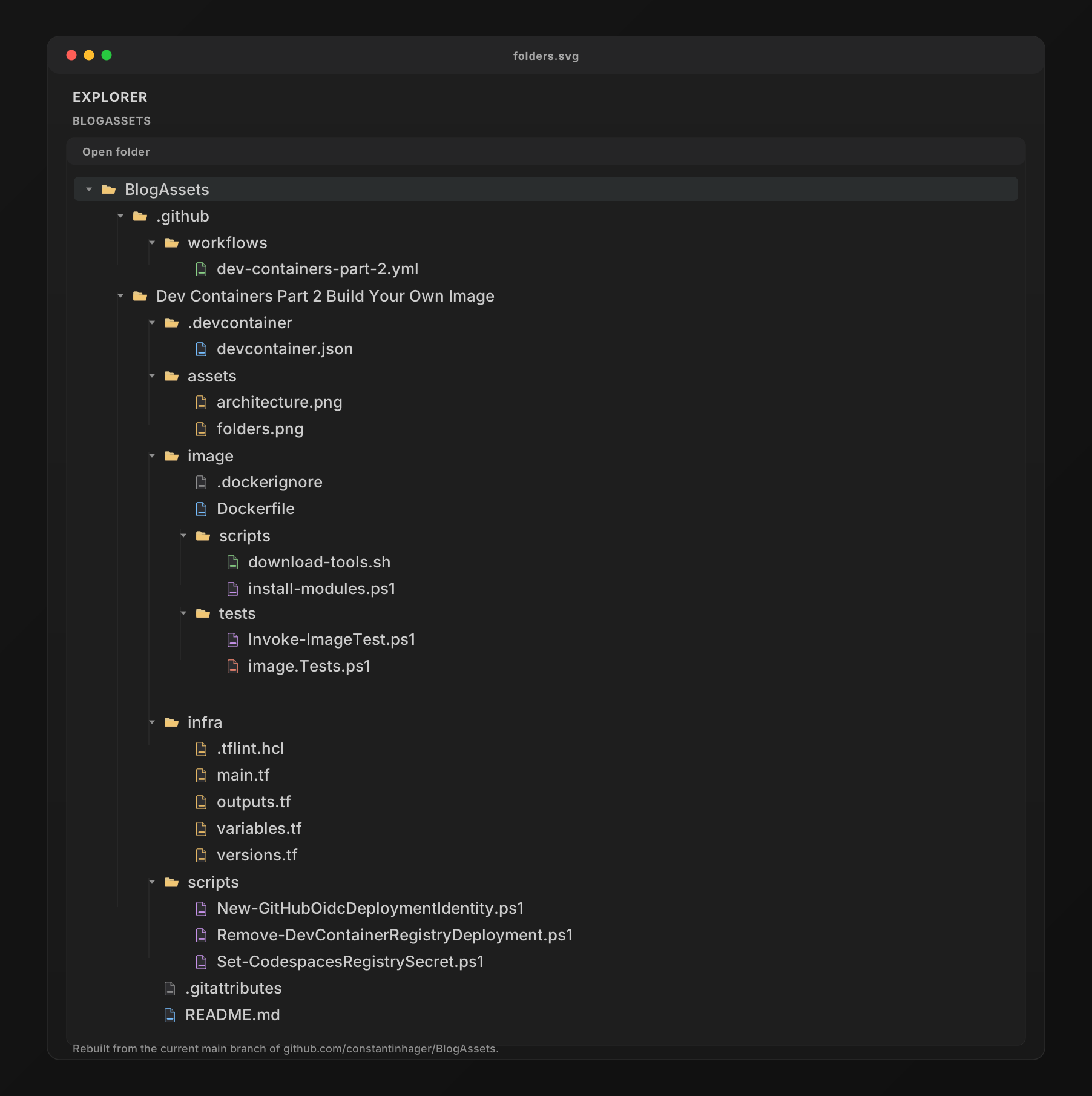
The folder structure:
The Dockerfile
The Dockerfile has two stages.
Stage 1 (downloads) downloads the release binaries and checks every file against the SHA256 checksum the project publishes next to it. Nothing that fails the check makes it into the image.
Stage 2 is the image itself. It copies only the verified binaries from stage 1. The zip files, the checksum files and the download script stay behind.
1
2
3
4
5
6
7
8
9
10
11
12
13
14
15
16
17
18
19
20
21
22
23
24
ARG BASE_IMAGE=mcr.microsoft.com/devcontainers/base:3-noble

FROM ${BASE_IMAGE} AS downloads

ARG TARGETARCH
ARG POWERSHELL_VERSION=7.6.7
ARG TERRAFORM_VERSION=1.16.6
ARG TFLINT_VERSION=0.64.0
ARG KUBECTL_VERSION=1.37.1
ARG HELM_VERSION=4.3.1
ARG GH_VERSION=2.102.0
# ...
COPY scripts/download-tools.sh /usr/local/bin/download-tools.sh
RUN chmod +x /usr/local/bin/download-tools.sh \
    && TARGETARCH="${TARGETARCH:-amd64}" /usr/local/bin/download-tools.sh

FROM ${BASE_IMAGE}

ARG AZURE_CLI_VERSION=2.91.0
ARG ANSIBLE_VERSION=14.5.0
ARG ANSIBLE_LINT_VERSION=26.10.1
# ...
COPY --from=downloads /out/bin/ /usr/local/bin/
COPY --from=downloads /out/powershell/ /opt/microsoft/powershell/7/
3-noble follows the 3.x releases of the base image (3.0.10 when I wrote this). The tag moves with minor and patch releases, but not to a new major version. The base image comes from MCR.
TARGETARCH is set by BuildKit (amd64 or arm64). The download script uses it for the file names, so the same Dockerfile also builds an ARM image. The pipeline only builds linux/amd64 - more on that at the end.
Download and verify
The heart of download-tools.sh is a small verify function. It looks up the file in the checksum file and compares the hash:
1
2
3
4
5
6
7
8
9
10
11
12
13
14
15
16
17
18
19
20
21
22
23
24
verify() {
    local file="$1"
    local sums="$2"
    local expected actual
    expected="$(as_utf8 "${sums}" \
        | awk -v f="${file}" '{ name = $2; sub(/^\*/, "", name) } name == f { print tolower($1); exit }')"
    if [[ -z "${expected}" ]]; then
        echo "No checksum for ${file} in ${sums}" >&2
        exit 1
    fi
    actual="$(sha256sum "${file}" | cut -d ' ' -f 1)"
    if [[ "${expected}" != "${actual}" ]]; then
        echo "Checksum mismatch for ${file}: expected ${expected}, got ${actual}" >&2
        exit 1
    fi
    echo "[ok] ${file}"
}

# Terraform
file="terraform_${TERRAFORM_VERSION}_linux_${TARGETARCH}.zip"
fetch "https://releases.hashicorp.com/terraform/${TERRAFORM_VERSION}/${file}"
fetch "https://releases.hashicorp.com/terraform/${TERRAFORM_VERSION}/terraform_${TERRAFORM_VERSION}_SHA256SUMS"
verify "${file}" "terraform_${TERRAFORM_VERSION}_SHA256SUMS"
unzip -o -q "${file}" terraform -d "${out_bin}"
Azure CLI from the Microsoft repository
The Azure CLI comes from Microsoft’s apt repository, pinned to one version. The version string is <version>-1~<codename>:
1
2
3
4
5
6
7
8
9
RUN install -d -m 0755 /etc/apt/keyrings \
    && curl -fsSL https://packages.microsoft.com/keys/microsoft.asc | gpg --dearmor -o /etc/apt/keyrings/microsoft.gpg \
    && chmod go+r /etc/apt/keyrings/microsoft.gpg \
    && . /etc/os-release \
    && printf 'Types: deb\nURIs: https://packages.microsoft.com/repos/azure-cli/\nSuites: %s\nComponents: main\nArchitectures: %s\nSigned-by: /etc/apt/keyrings/microsoft.gpg\n' \
        "${VERSION_CODENAME}" "$(dpkg --print-architecture)" > /etc/apt/sources.list.d/azure-cli.sources \
    && apt-get update \
    && DEBIAN_FRONTEND=noninteractive apt-get install -y --no-install-recommends "azure-cli=${AZURE_CLI_VERSION}-1~${VERSION_CODENAME}" \
    && rm -rf /var/lib/apt/lists/*
Ansible in a virtual environment
Ubuntu 24.04 refuses pip install into the system Python (PEP 668, “externally managed environment”). Ansible gets its own virtual environment in /opt/ansible:
1
2
3
4
RUN python3 -m venv /opt/ansible \
    && /opt/ansible/bin/pip install --no-cache-dir --upgrade pip \
    && /opt/ansible/bin/pip install --no-cache-dir "ansible==${ANSIBLE_VERSION}" "ansible-lint==${ANSIBLE_LINT_VERSION}" \
    && for tool in /opt/ansible/bin/ansible*; do ln -s "${tool}" /usr/local/bin/; done
ansible is the community package with the collections (including azure.azcollection). It pulls in ansible-core 2.21.5, which needs Python 3.12 or newer. Ubuntu 24.04 has 3.12. Symlinks alone are not enough, though - see “Things to watch out for”.
PowerShell modules for all users
install-modules.ps1 is the post-create script from Part 1, moved into the image. The main difference is -Scope AllUsers, so the modules land in /usr/local/share/powershell/Modules:
1
2
3
4
5
6
7
8
9
10
11
12
13
14
15
16
17
18
19
20
21
$modules = @(
	@{ Name = 'Pester'; Version = '5.7.1' }
	@{ Name = 'PSScriptAnalyzer'; Version = '1.24.0' }
	@{ Name = 'PSFramework' }
	@{ Name = 'powershell-yaml' }
	@{ Name = 'Az.Accounts' }
	@{ Name = 'Az.Resources' }
	@{ Name = 'Az.ContainerRegistry' }
	@{ Name = 'Microsoft.Graph.Authentication' }
)

foreach ($module in $modules) {
	$install = @{
		Repository      = 'PSGallery'
		Scope           = 'AllUsers'
		TrustRepository = $true
		AcceptLicense   = $true
		Quiet           = $true
	}
	Install-PSResource @module @install
}
Modules without Version get the newest version at build time. That was a problem in Part 1: every rebuild could bring a different version. In the image it isn’t: the image tag freezes the versions. A team member who uses tag 20261016 gets exactly the modules that were tested on that day.
The image brings its own VS Code setup
A dev container image can carry its devcontainer.json settings in a label called devcontainer.metadata. VS Code and Codespaces read the label and merge it with the devcontainer.json of the repository.
1
2
3
4
5
6
7
8
9
10
11
12
13
14
15
16
17
18
19
20
21
22
23
24
25
26
27
28
29
30
31
32
LABEL devcontainer.metadata='[{ \
    "remoteUser": "vscode", \
    "customizations": { \
        "vscode": { \
            "extensions": [ \
                "ms-vscode.powershell", \
                "pspester.pester-test", \
                "usernamehw.errorlens", \
                "tylerleonhardt.vscode-inline-values-powershell", \
                "ironmansoftware.powershellprotools", \
                "santacodes.santacodes-region-viewer", \
                "hashicorp.terraform", \
                "redhat.ansible", \
                "redhat.vscode-yaml", \
                "ms-kubernetes-tools.vscode-kubernetes-tools", \
                "github.vscode-github-actions", \
                "editorconfig.editorconfig" \
            ], \
            "settings": { \
                "terminal.integrated.defaultProfile.linux": "pwsh", \
                "powershell.codeFormatting.preset": "OTBS", \
                "ansible.python.interpreterPath": "/opt/ansible/bin/python", \
                "ansible.validation.lint.path": "/usr/local/bin/ansible-lint", \
                ... \
                "[powershell]": { \
                    "editor.semanticHighlighting.enabled": true, \
                    "editor.wordSeparators": "`~!@#$%^&*()-=+[{]}\\|;:\u0027\",.<>/?" \
                } \
            } \
        } \
    } \
}]'
The label is JSON inside a single-quoted Dockerfile string. Two rules follow from that: every line except the last ends with \, and the JSON can’t contain a '. The ' in editor.wordSeparators is written as the JSON escape \u0027 - VS Code reads it as the same character.
So the tools and the matching VS Code extensions come as one package. The Terraform extension without Terraform, or Ansible without the Ansible extension, can’t happen anymore.
The base image also has this label. A LABEL with the same key in my Dockerfile replaces it, it doesn’t merge. That’s why "remoteUser": "vscode" is in my label again.
Testing the image with Pester
An image that builds is not an image that works. Before anything is pushed, the pipeline starts the image and runs Pester tests inside it - as the vscode user, like in VS Code.
The trick: the tests read the expected versions from the Dockerfile. The Dockerfile stays the only place where a version is written down. Change ARG TERRAFORM_VERSION=1.16.6 and the test expects the new version.
1
2
3
4
5
6
7
8
9
10
11
12
13
14
15
16
17
18
19
20
21
22
23
BeforeDiscovery {
	$dockerfile = Join-Path $PSScriptRoot '..' 'Dockerfile'
	$expected = @{}
	foreach ($line in Select-String -Path $dockerfile -Pattern '^ARG (\w+)_VERSION=(\S+)$') {
		$expected[$line.Matches[0].Groups[1].Value] = $line.Matches[0].Groups[2].Value
	}

	$tools = @(
		@{ Name = 'PowerShell'; Expected = $expected.POWERSHELL; Command = { $PSVersionTable.PSVersion.ToString() } }
		@{ Name = 'Terraform'; Expected = $expected.TERRAFORM; Command = { (terraform version -json | ConvertFrom-Json).terraform_version } }
		@{ Name = 'Azure CLI'; Expected = $expected.AZURE_CLI; Command = { (az version --output json | ConvertFrom-Json).'azure-cli' } }
		@{ Name = 'Ansible'; Expected = $expected.ANSIBLE; Command = { ansible-community --version } }
		@{ Name = 'kubectl'; Expected = $expected.KUBECTL; Command = { (kubectl version --client --output json | ConvertFrom-Json).clientVersion.gitVersion } }
		# ... TFLint, ansible-lint, Helm, GitHub CLI
	)
}

Describe 'Tools' {
	It '<Name> is installed in version <Expected>' -ForEach $tools {
		$output = & $Command 2>&1 | Out-String
		$output | Should -Match ([regex]::Escape($Expected))
	}
}
Further tests check the pinned module versions, that the container runs as vscode, and that the Terraform plugin cache is writable. The pipeline calls them like this:
1
2
3
4
docker run --rm --user vscode \
  --volume "$PWD/image:/image:ro" \
  <image id> \
  pwsh -NoLogo -NoProfile -File /image/tests/Invoke-ImageTest.ps1
Invoke-ImageTest.ps1 sets Run.Exit = $true in the Pester configuration. A failed test means a failed step, and nothing is pushed.
The Azure resources with Terraform
infra/ deploys:
- an Azure Container Registry, SKU Basic, admin user off
- AcrPush for the image identity of the pipeline
- AcrPull for the team (Entra ID groups or users)
- a scope map + token for GitHub Codespaces that can only read the image repository
Basic is enough for a few dev container images: it includes 10 GiB of storage. role_assignment_mode = "LegacyRegistryPermissions" is the default. I set it anyway, because the other mode (AbacRepositoryPermissions) ignores AcrPull and AcrPush and needs the “Container Registry Repository” roles instead. That’s a nice feature for big registries with many teams for our scenario not needed.
A token for GitHub Codespaces - without the password in the state
GitHub Codespaces can’t sign in to ACR with Entra ID. It needs a user name and a password. ACR has tokens for that: a token is bound to a scope map, and the scope map lists exactly what the token may do. Tokens and scope maps are available in all ACR tiers, including Basic.
1
2
3
4
5
6
7
8
9
10
11
12
13
14
15
16
17
18
19
20
resource "azurerm_container_registry_scope_map" "codespaces" {
  count = var.codespaces_token_enabled ? 1 : 0

  name                    = "codespaces-pull"
  container_registry_name = azurerm_container_registry.this.name
  resource_group_name     = data.azurerm_resource_group.this.name
  actions = [
    "repositories/${var.image_repository}/content/read",
    "repositories/${var.image_repository}/metadata/read",
  ]
}

resource "azurerm_container_registry_token" "codespaces" {
  count = var.codespaces_token_enabled ? 1 : 0

  name                    = "codespaces-pull"
  container_registry_name = azurerm_container_registry.this.name
  resource_group_name     = data.azurerm_resource_group.this.name
  scope_map_id            = azurerm_container_registry_scope_map.codespaces[0].id
}
Terraform creates the token without a password. There is an azurerm_container_registry_token_password resource, but then the password would sit in the Terraform state. Instead, a small script generates the password with an expiry date (see “Pulling the image” below).
Federated credentials: the bootstrap script
scripts/New-GitHubOidcDeploymentIdentity.ps1 runs once, before the first pipeline run. It is the same idea as in the Azure Update Manager post, with two changes:
- Two identities instead of one. One for Terraform, one for
docker push. - Resource group scope instead of subscription scope.
1
2
3
4
5
6
7
8
9
10
11
12
13
Connect-AzAccount
$identity = @{
	GitHubOrganization = 'your-org'
	GitHubRepository   = 'your-repo'
	AcrPullGroupName   = 'grp-devcontainer-acrpull'
	AcrPullGroupMember = @(
		'alice@contoso.com'
		'bob@contoso.com'
	)
	ConfigureGitHub    = $true
	ResolveGitHubId    = $true
}
./scripts/New-GitHubOidcDeploymentIdentity.ps1 @identity
What it creates:
| Step | What |
|---|---|
| 1 | Registers Microsoft.ContainerRegistry and Microsoft.Storage and waits until they are registered |
| 2 | Resource groups rg-devcontainer-registry (registry) and rg-devcontainer-tfstate (state) |
| 3 | State storage account: allowSharedKeyAccess = false, versioning, soft delete |
| 4 | The registry name: checked for global availability with checkNameAvailability, created later by Terraform |
| 5 | Two app registrations + service principals with federated credentials, optionally the AcrPull group |
| 6 | Role assignments for the Terraform identity |
| 7 | With -ConfigureGitHub: the GitHub environment and the repository variables via gh |
Two identities, different subjects
| Identity | Federated credential subject | Used by |
|---|---|---|
...-devcontainer-infra | repo:<org>/<repo>:ref:refs/heads/main | terraform plan on pushes to main |
repo:<org>/<repo>:pull_request | terraform plan on pull requests | |
repo:<org>/<repo>:environment:devcontainer-registry | terraform apply | |
...-devcontainer-image | repo:<org>/<repo>:ref:refs/heads/main | docker push (push to main, weekly schedule, manual run) |
The image identity gets no role from the bootstrap script. Terraform gives it AcrPush on the registry. If the image job is ever compromised, the worst case is a bad image in one registry, not a changed resource group.
The Terraform identity gets:
- Contributor on
rg-devcontainer-registry - Storage Blob Data Contributor on the state container (not the whole account)
- Role Based Access Control Administrator on
rg-devcontainer-registry, with a condition
Terraform has to create the AcrPull and AcrPush assignments, so it needs Microsoft.Authorization/roleAssignments/write. I allowed a list instead of blocking one: only AcrPull and AcrPush.
1
2
3
4
5
6
7
((!(ActionMatches{'Microsoft.Authorization/roleAssignments/write'}))
  OR (@Request[Microsoft.Authorization/roleAssignments:RoleDefinitionId]
      ForAnyOfAnyValues:GuidEquals {7f951dda-4ed3-4680-a7ca-43fe172d538d, 8311e382-0749-4cb8-b61a-304f252e45ec}))
AND
((!(ActionMatches{'Microsoft.Authorization/roleAssignments/delete'}))
  OR (@Resource[Microsoft.Authorization/roleAssignments:RoleDefinitionId]
      ForAnyOfAnyValues:GuidEquals {7f951dda-4ed3-4680-a7ca-43fe172d538d, 8311e382-0749-4cb8-b61a-304f252e45ec}))
7f951dda-... is AcrPull, 8311e382-... is AcrPush. An allow list is the stronger condition: a new privileged built-in role can’t slip through.
A group for everyone who pulls
A group can pull that image. With -AcrPullGroupName the script creates an Entra ID security group (or reuses it on a re-run) and writes its object ID to ACR_PULL_PRINCIPAL_IDS. Terraform then gives the group AcrPull on the registry. The person who runs the script becomes a member automatically, so the first pull works right away. -AcrPullGroupMember adds more people by user principal name or object ID; members who are already in the group are skipped.
New team members later go into the group, not into Terraform. No pipeline run, no new role assignment. If you already have a team group, pass its object ID with -AcrPullPrincipalId instead.
The workflow
Registry and image live in one workflow: .github/workflows/dev-containers-part-2.yml. It has four jobs:
| Job | Runs when | What |
|---|---|---|
changes | always | Finds out what changed: infra/, image/ or the workflow file |
terraform-plan | infra/ changed | init, fmt -check, validate, plan, plan as job summary |
terraform-apply | after the plan, main only, environment devcontainer-registry | plan -out tfplan + apply tfplan |
image | image/ changed, after Terraform | build, Pester tests, push (main only) |
Why one workflow? The image needs the registry. In one workflow, needs: puts them in the right order: on the very first run Terraform creates the registry, and the image job pushes into it right after. With two workflows I had to start them one after the other by hand.
But a change to the Dockerfile shouldn’t run Terraform, and a change to main.tf shouldn’t rebuild the image. That’s what the changes job is for. It compares the commit with the previous one:
1
2
3
4
5
6
7
8
9
10
case "${EVENT}" in
  workflow_dispatch) infra=true; image=true ;;
  schedule) image=true ;;
  *)
    changed="$(git diff --name-only "${BASE_SHA}" "${HEAD_SHA}")"
    if grep -qF ".github/workflows/dev-containers-part-2.yml" <<< "${changed}"; then infra=true; image=true; fi
    if grep -qF "${PROJECT_DIR}/infra/" <<< "${changed}"; then infra=true; fi
    if grep -qF "${PROJECT_DIR}/image/" <<< "${changed}"; then image=true; fi
    ;;
esac
BASE_SHA is the base of the pull request, or the previous commit of a push (github.event.before). For a new branch there is no previous commit - then both run. A manual run always runs both. The weekly schedule only rebuilds the image.
The image job waits for Terraform, but it must also run when Terraform was skipped. A plain needs: would skip the image job too, because a skipped dependency isn’t a successful one. So the condition is written out:
1
2
3
4
5
6
  image:
    needs: [changes, terraform-plan, terraform-apply]
    if: >-
      !cancelled()
      && needs.changes.outputs.image == 'true'
      && !contains(needs.*.result, 'failure')
Skipped Terraform jobs are fine, a failed plan or apply stops the image.
The Terraform jobs
The repository variables become Terraform variables through TF_VAR_* environment variables:
1
2
3
4
5
6
7
8
9
env:
  ARM_CLIENT_ID: ${{ vars.AZURE_INFRA_CLIENT_ID }}
  ARM_TENANT_ID: ${{ vars.AZURE_TENANT_ID }}
  ARM_SUBSCRIPTION_ID: ${{ vars.AZURE_SUBSCRIPTION_ID }}
  ARM_USE_OIDC: "true"
  TF_VAR_resource_group_name: ${{ vars.AZURE_RESOURCE_GROUP }}
  TF_VAR_registry_name: ${{ vars.ACR_NAME }}
  TF_VAR_image_push_principal_id: ${{ vars.AZURE_IMAGE_PRINCIPAL_ID }}
  TF_VAR_acr_pull_principal_ids: ${{ vars.ACR_PULL_PRINCIPAL_IDS || '[]' }}
The registry name is a repository variable, not a Terraform output. The image job needs it too, and a workflow can’t write repository variables with its GITHUB_TOKEN. So the bootstrap script picks the name once and both jobs read it.
The image job
The image job runs for pull requests (build + test only), pushes to main, the weekly schedule and manual runs. The schedule matters: the base image and the Ubuntu packages get security fixes, and a dev container image that is never rebuilt gets old. The scheduled run builds with no-cache.
The image is built, tested and pushed in one job:
docker/build-push-actionbuilds the image into the local Docker engine (load: true).- The Pester tests run inside the image.
- A second test checks the
devcontainer.metadatalabel withdocker inspectandjq. - Only on main:
azure/loginwith OIDC,Connect-AzContainerRegistry(Az PowerShell), thendocker/build-push-actionagain withpush: true.
1
2
3
4
5
6
7
8
9
10
11
12
13
14
15
16
17
18
19
20
21
22
23
24
25
26
27
28
29
30
31
32
33
34
35
36
37
38
39
40
41
42
43
44
45
46
47
48
49
50
51
52
53
      - name: Build
        id: build
        uses: docker/build-push-action@v7
        with:
          context: ${{ env.IMAGE_DIR }}
          platforms: linux/amd64
          pull: true
          no-cache: ${{ github.event_name == 'schedule' }}
          load: true
          push: false
          provenance: false
          tags: ${{ steps.meta.outputs.tags }}
          labels: ${{ steps.meta.outputs.labels }}
          cache-from: type=gha,scope=devcontainer-devops
          cache-to: type=gha,scope=devcontainer-devops,mode=max

      - name: Test - tool versions and modules (Pester)
        run: >
          docker run --rm --user vscode
          --volume "${{ github.workspace }}/${{ env.IMAGE_DIR }}:/image:ro"
          "${{ steps.build.outputs.imageid }}"
          pwsh -NoLogo -NoProfile -File /image/tests/Invoke-ImageTest.ps1

      - name: Azure login (OIDC)
        if: github.event_name != 'pull_request' && github.ref == 'refs/heads/main'
        uses: azure/login@v3
        with:
          client-id: ${{ vars.AZURE_IMAGE_CLIENT_ID }}
          tenant-id: ${{ vars.AZURE_TENANT_ID }}
          subscription-id: ${{ vars.AZURE_SUBSCRIPTION_ID }}
          enable-AzPSSession: true

      - name: Log in to Azure Container Registry
        if: github.event_name != 'pull_request' && github.ref == 'refs/heads/main'
        uses: azure/powershell@v3
        with:
          azPSVersion: latest
          inlineScript: |
            Connect-AzContainerRegistry -Name '${{ vars.ACR_NAME }}'

      - name: Push
        id: push
        if: github.event_name != 'pull_request' && github.ref == 'refs/heads/main'
        uses: docker/build-push-action@v7
        with:
          context: ${{ env.IMAGE_DIR }}
          platforms: linux/amd64
          push: true
          provenance: mode=max
          sbom: true
          tags: ${{ steps.meta.outputs.tags }}
          labels: ${{ steps.meta.outputs.labels }}
          cache-from: type=gha,scope=devcontainer-devops
Why build twice? The first build has to land in the local Docker engine so the tests can run it. The second build runs on the same builder with the same inputs, so every layer comes from the cache of the first one. What gets pushed is the tested image - plus a provenance attestation and an SBOM, which ACR stores next to the image.
Think of the SBOM as the image’s ingredient list. It tells you what is inside the container, which versions were included and where those components came from. That helps with vulnerability management, compliance and supply-chain transparency.
Why one job and not “build” and “push” as two jobs? Two jobs run on two runners. The second runner would have to rebuild the image from the GitHub Actions cache, and I want to be sure the pushed image is the tested one.
docker/metadata-action creates the tags:
| Tag | When | Use |
|---|---|---|
latest | main | Always the newest image |
20261016 | main | A fixed date - pin this in devcontainer.json |
sha-1a2b3c4 | always | The Git commit the image was built from |
The job summary shows the digest of the pushed image. <registry>.azurecr.io/devcontainers/devops@sha256:... is the strictest way to pin it.
The devcontainer.json
Thanks to the metadata label the file is short. You only need to specify what is unique to this repository. You can check the file itself here for reference: devcontainer.json
How the merge works: the extensions of the image and of the file are combined. For settings, the file wins over the image. remoteUser comes from the image.
For a team I’d pin the date tag instead of latest. Updating the image is then a one-line pull request: change 20261016 to the new date, open the container, done. Same rule as in Part 1: the file is the truth.
Rule of thumb for what goes where:
- Image: everything every project needs. Tools, modules, VS Code extensions for these tools.
- devcontainer.json: what only this repository needs. One more extension, the Ansible collections of this project, a project setting.
Pulling the image
Locally in VS Code
The registry is private. VS Code uses the Docker credentials of your machine, so sign in once before you open the container:
1
2
Connect-AzAccount
Connect-AzContainerRegistry -Name yourRegistryName
Then Dev Containers: Reopen in Container. Your Entra ID account needs AcrPull - through the group from the bootstrap script (-AcrPullGroupName). If you were added to the group only a moment ago, run Connect-AzAccount again first, so your sign-in picks up the new membership.
Connect-AzContainerRegistry is in the Az.ContainerRegistry module. It gets a registry token for your Entra ID account and runs docker login with it - the same thing az acr login does. So it needs the Docker CLI on your machine, and Docker stores the credential like after any docker login. The registry token is short-lived. That’s enough: Docker only needs it for the pull. A container that is already running keeps running.
No Docker CLI, e.g. with Podman? -ExposeToken returns the token instead of calling docker login:
1
2
3
$cred = Connect-AzContainerRegistry -Name yourRegistryName -ExposeToken
$cred.accessToken | ConvertFrom-SecureString -AsPlainText |
podman login $cred.loginServer --username 00000000-0000-0000-0000-000000000000 --password-stdin
GitHub Codespaces
Codespaces reads three secrets with a fixed naming pattern and runs docker login with them before it pulls the image:
1
2
3
<PREFIX>_CONTAINER_REGISTRY_SERVER     yourRegistryName.azurecr.io
<PREFIX>_CONTAINER_REGISTRY_USER       codespaces-pull
<PREFIX>_CONTAINER_REGISTRY_PASSWORD   <token password>
scripts/Set-CodespacesRegistrySecret.ps1 generates a token password with an expiry date and writes the three secrets as repository-level Codespaces secrets:
1
2
3
4
5
6
7
Connect-AzAccount
gh auth login
$secret = @{
	RegistryName     = 'yourRegistryName'
	GitHubRepository = 'yourGitHubOrg/yourRepositoryName'
}
./scripts/Set-CodespacesRegistrySecret.ps1 @secret
Inside, it is two steps. First a call to the generateCredentials API of the registry with name: password1 and an expiry 90 days from now. Then gh secret set --app codespaces. The password goes to gh through stdin, not as a command line argument. Az.ContainerRegistry and gh are in the image, so you can run the script in the dev container itself.
Why the REST API and not New-AzContainerRegistryCredentials? The cmdlet creates the password just fine, but it returns that into an object it uses for the admin credentials: plain Password and Password2 strings, without the password names and without the expiry date. My first version looked for the password by name, found nothing and stopped with “No password returned” - while the portal already showed the new password1. Invoke-AzRestMethod with -WaitForCompletion returns the API answer as it is: username and a passwords list with name, value and expiry.
An ACR token has two passwords. That makes rotation easy: before password1 expires, run the script with -PasswordName password2. The secret switches to the new password, the old one keeps working until it expires. Running codespaces need a restart to see the new secret.
Codespaces only finds a
devcontainer.jsonin.devcontainer/(or a subfolder of it) at the root of the repository. In my BlogAssets repository the file lives in the project folder, so it works with VS Code but not with Codespaces. In your own project, put it at the root.
Things to watch out for
- PowerShell’s checksum file is UTF-16. See above. If you write your own download script, look at the file with
file hashes.sha256first. Set-PSResourceRepositoryin a fresh image. In Part 1 the post-create script started withSet-PSResourceRepository -Name PSGallery -Trusted. In the image build it failed with “Cannot retrieve the dynamic parameters for the cmdlet. Loading repository store failed: Could not find a part of the path ‘/root/.local/share/PSResourceGet/PSResourceRepository.xml’”. In a fresh image nothing has used PSResourceGet yet, so the repository store doesn’t exist - and the cmdlet reads it while it resolves its parameters, before anything creates it.Install-PSResourcecreates the store itself, so-TrustRepositoryon the install is the simpler way.- ansible-lint and the PATH. With only the symlinks in
/usr/local/bin,ansible-lintprintsWARNING: PATH altered to include /opt/ansible/binon every run - it wants the bin folder of its own Python on the PATH. The Dockerfile appends/opt/ansible/bintoPATH. Side effect:pipandpython(without the 3) in the container are the ones from the Ansible venv. That’s useful:pip installfor the Python dependencies of an Ansible collection lands where Ansible looks for it. - Old images pile up. Every build adds a
sha-tag, and every newlatestleaves the previous manifest untagged. ACR’s retention policy for untagged manifests is Premium only. On Basic,acr purgedoes the job, manually or as a scheduled ACR task. This one deletessha-tags older than 30 days plus the manifests that have no tag left. Date tags andlateststay. Look at the--dry-runoutput first:1 2
az acr run --registry acrdevcontainerx1y2z3 /dev/null ` --cmd "acr purge --filter 'devcontainers/devops:^sha-' --ago 30d --untagged --dry-run"
- Image size. The Azure CLI is the biggest single part. The job summary shows the size of every build. The first pull takes a while; after that, only changed layers are downloaded.
Cleaning up
A demo should be easy to remove. scripts/Remove-DevContainerRegistryDeployment.ps1 is the counterpart of the bootstrap script, the Terraform deployment, the workflow and the Codespaces script. It removes:
| Step | What |
|---|---|
| 1 | All role assignments of both identities, and the AcrPull assignments on the registry |
| 2 | rg-devcontainer-registry - the registry with all images, the scope map and the token |
| 3 | rg-devcontainer-tfstate - the Terraform state |
| 4 | Both app registrations and service principals, with their federated credentials, and the AcrPull group (with -AcrPullGroupName) |
| 5 | GitHub: the runs of the workflow, the Docker layer cache, the environment with its deployments, the repository variables and the Codespaces secrets |
It is destructive, so it supports -WhatIf and asks before every step (-Force skips the questions):
1
2
3
4
5
6
7
8
9
Connect-AzAccount
gh auth login
$cleanup = @{
	GitHubOrganization = 'yourGitHubOrg'
	GitHubRepository   = 'yourRepositoryName'
	AcrPullGroupName   = 'grp-devcontainer-acrpull'
	WhatIf             = $true
}
./scripts/Remove-DevContainerRegistryDeployment.ps1 @cleanup
Two things stay: the resource provider registrations (they cost nothing) and the Docker credentials on your own machine - docker logout acrdevcontainerx1y2z3.azurecr.io removes those.
Conclusion
Part 1 put the environment into a file. Part 2 puts the tools into an image. The devcontainer.json shrinks to a pointer, and the image is built, tested and versioned like any other artifact: one Dockerfile with every version in it, Pester tests that run inside the image, a registry deployed with Terraform, and one workflow without a single secret.
That’s it for this Blog post series.