Serverless On-Demand Patching for Azure Update Manager
Azure Update Manager is great in the portal. But I don’t want to click through the portal every time a group of servers needs patching. I want one HTTP call: “check updates for all servers with tag UpdateGroup=Wave1” or “install updates on Wave1, but not these three KBs”.
So I built an Azure Function for it. It uses plain ARM REST calls - no Az module. The list of blocked KBs lives in Azure Table Storage. The whole thing - VM, storage, Function App, permissions - is deployed with Terraform and GitHub Actions, without a single secret.
The complete project is on GitHub: BlogAssets / Serverless On-Demand Patching for Azure Update Manager.
What the function does
Five HTTP endpoints, each one a PowerShell function:
| Endpoint | What it does |
|---|---|
Start-UpdateAssessment | “Check for updates” on all machines with a tag |
Start-OneTimeUpdate | One-time update on all machines with a tag and/or on a list of machines by name, minus the excluded KBs |
New-UpdateMaintenanceConfiguration | Creates a schedule (maintenance configuration), optionally with a dynamic scope by tag |
Get-UpdateMaintenanceConfiguration | Lists all schedules incl. their dynamic scopes |
Get-UpdateManagerMachine | Lists every machine Update Manager can see, with the latest assessment |
All of them work for Azure VMs and Azure Arc-enabled servers. The difference is the resource provider (Microsoft.Compute/virtualMachines vs. Microsoft.HybridCompute/machines) and its API version. My sample environment only contains an Azure VM, so the Arc path follows the REST documentation but isn’t tested in my lab yet.
Architecture
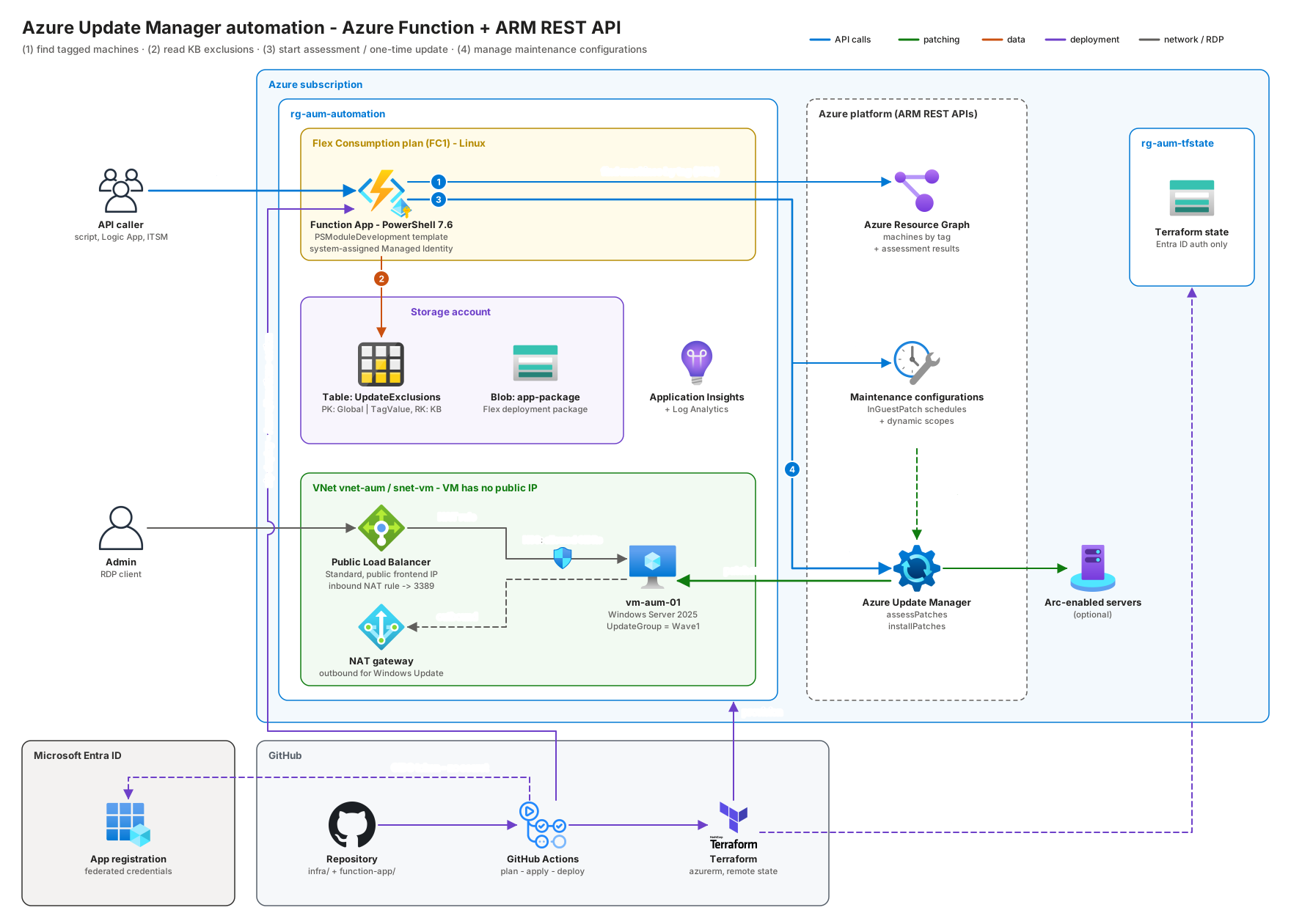
The flow for a one-time update:
- The caller sends
POST /api/Start-OneTimeUpdatewithTagNameandTagValue- or with a list of machine names (MachineName), or both. - The function asks Azure Resource Graph for all VMs and Arc servers with that tag and for the machines with these names. One query per selection covers all subscriptions.
- It reads the excluded KBs from the table: partition
Globalplus the partition named like the tag value (e.g.Wave1). When you select by name,ExclusionScopenames that partition. - It calls
installPatcheson each machine. Windows machines get the exclusions inkbNumbersToExclude. - ARM answers
202 Accepted. The function returns the list of machines and the status per machine. The run itself shows up in Azure Update Manager.
Why REST and not the Az module?
Three reasons:
- Cold start. The Az modules are big. A Flex Consumption app has no Managed Dependencies, so every module gets bundled into the package.
Az.Accounts+Az.Compute+Az.Maintenance+Az.ResourceGraphis a lot of weight for five HTTP calls. - No version drift. The API versions are pinned in one place. A new Az release can’t change the behaviour.
- Full API surface. New properties land in the REST API first. The cmdlets follow later.
The scaffold: PSModuleDevelopment’s AzureFunction template
I didn’t start from func init. I used the AzureFunction template from Friedrich Weinmann’s PSModuleDevelopment module:
1
2
3
4
5
6
7
Install-Module PSModuleDevelopment -Scope CurrentUser
Invoke-PSMDTemplate -TemplateName AzureFunction -OutPath ./function-app -Parameters @{
    name        = 'UpdateManagerAutomation'
    author      = 'Constantin Hager'
    company     = 'the-itguy.de'
    description = 'Azure Function App that drives Azure Update Manager via ARM REST calls'
}
The idea of the template: you write a normal PowerShell module. Every function in functions/httpTrigger becomes an HTTP endpoint with the same name. The build script generates function.json and run.ps1 for each one. Parameters are bound from the query string or the JSON body by Get-RestParameter from the Azure.Function.Tools module.
1
2
3
4
5
6
7
8
9
function-app/
├── build/
│   ├── build.ps1              # creates Function.zip (Save-Module)
│   ├── psf-build.ps1          # same, with PSFramework.NuGet / Save-PSFModule (used by the workflow)
│   └── build.config.psd1      # Flex Consumption switch, auth levels, HTTP methods
├── function/                  # host.json, profile.ps1, requirements.psd1
└── UpdateManagerAutomation/
    ├── functions/httpTrigger/ # Start-OneTimeUpdate.ps1 -> /api/Start-OneTimeUpdate
    └── internal/functions/    # REST helpers, no endpoint
Flex Consumption: flip one switch
Flex Consumption doesn’t support Managed Dependencies. The template knows that. In build/build.config.psd1:
1
2
3
General = @{
    FlexConsumption = $true
}
With that, the build downloads the modules from requirements.psd1 into the package and disables managedDependency in host.json. I also set the HTTP methods per endpoint - read-only endpoints accept GET, everything that changes something is POST only:
1
2
3
4
5
6
7
MethodOverrides = @{
    'Get-UpdateManagerMachine'           = @('get', 'post')
    'Get-UpdateMaintenanceConfiguration' = @('get', 'post')
    'Start-UpdateAssessment'             = @('post')
    'Start-OneTimeUpdate'                = @('post')
    'New-UpdateMaintenanceConfiguration' = @('post')
}
The REST building blocks
1. A token from the Managed Identity
Every Function App with a Managed Identity gets two environment variables: IDENTITY_ENDPOINT and IDENTITY_HEADER:
1
2
3
$uri = '{0}?resource={1}&api-version=2019-08-01' -f $env:IDENTITY_ENDPOINT, [uri]::EscapeDataString($Resource)
$response = Invoke-RestMethod -Uri $uri -Headers @{ 'X-IDENTITY-HEADER' = $env:IDENTITY_HEADER }
$token = $response.access_token
The helper caches the token per resource (https://management.azure.com/ and https://storage.azure.com/) until five minutes before it expires. For local development there is no identity endpoint, so it falls back to az account get-access-token.
2. One wrapper for all ARM calls
Invoke-AumArmRequest adds the token and the api-version, follows nextLink and turns ARM errors into readable exceptions. One detail I care about: it refuses to send the token to any host other than management.azure.com.
1
2
3
4
5
6
7
8
9
10
11
12
13
14
15
16
17
18
19
20
$Param = @{
    Method                  = 'GET'
    Uri                     = $uri
    Headers                 = $headers
    Body                    = $jsonBody
    ContentType             = 'application/json'
    SkipHttpErrorCheck      = $true
    ResponseHeadersVariable = 'responseHeaders'
    StatusCodeVariable      = 'statusCode'
}
$content = Invoke-RestMethod @Param

if (($statusCode -eq 429 -or $statusCode -ge 500) -and $attempt -lt $MaxRetry) {
    # wait Retry-After seconds, then retry
}
if ($statusCode -ge 400) {
    $message = $content.error.message
    if ($content.error.details) { $message += " Details: $($content.error.details | ConvertTo-Json -Depth 5 -Compress)" }
    throw "ARM request failed: $Method $uri -> $statusCode $($content.error.code) $message"
}
3. Find the machines by tag - Azure Resource Graph
Tag names in Azure are case-insensitive. tags['UpdateGroup'] in KQL is not. So the query expands the tag bag and compares with =~:
resources
| where type in~ ('microsoft.compute/virtualmachines', 'microsoft.hybridcompute/machines')
| mv-expand bagexpansion=array tags
| where tostring(tags[0]) =~ 'UpdateGroup' and tostring(tags[1]) =~ 'Wave1'
| extend osType = iff(type =~ 'microsoft.compute/virtualmachines',
                      tostring(properties.storageProfile.osDisk.osType), tostring(properties.osType))
| extend state  = iff(type =~ 'microsoft.compute/virtualmachines',
                      tostring(properties.extended.instanceView.powerState.code), tostring(properties.status))
| project id, name, type, resourceGroup, subscriptionId, location, osType, state
Tag name and value come from the HTTP caller, so they are escaped before they go into the query. The state column lets the function skip deallocated VMs and disconnected Arc servers instead of collecting errors.
Get-UpdateManagerMachine uses the same idea and joins patchassessmentresources. That gives you the last assessment time, reboot pending and the number of critical, security and other updates per machine - in one call. When you start an update for a list of machine names, the function uses the same query with where name in~ (...) instead of the tag filter.
4. The exclusion list - Azure Table Storage via REST
One row per blocked update:
| PartitionKey | RowKey | Title | Reason | Enabled | ExpiresOn |
|---|---|---|---|---|---|
Global | KB5122871 | 2026-09 Security Update for Windows Server 2025 | Example: RDS bug | true |
Global applies to every run. Any other partition only applies to machines with that tag value. Enabled = false switches a row off without deleting it. ExpiresOn is for “block this until the fixed version is out”.
The query is a plain GET with an OData filter. Two things matter for Entra ID auth against Table Storage: the token for https://storage.azure.com/ and x-ms-version 2020-12-06 or newer:
1
2
3
4
5
6
7
8
9
$filter  = "PartitionKey eq 'Global'"
$uri     = "https://$account.table.core.windows.net/UpdateExclusions()?`$filter=$([uri]::EscapeDataString($filter))"
$headers = @{
    Authorization  = "Bearer $(Get-AumAccessToken -Resource 'https://storage.azure.com/')"
    'x-ms-version' = '2020-12-06'
    'x-ms-date'    = [DateTime]::UtcNow.ToString('R')
    Accept         = 'application/json;odata=nometadata'
}
Invoke-RestMethod -Uri $uri -Headers $headers -ResponseHeadersVariable responseHeaders
Table Storage doesn’t page with a nextLink. It sends x-ms-continuation-NextPartitionKey / NextRowKey headers instead, and the helper follows them. The Managed Identity has Storage Table Data Reader on this one table - not on the whole account, and no account key.
Calling it
scripts/Invoke-UpdateManagerFunction.ps1 is a small test client. It signs in with your Az context, reads the default function key via POST .../host/default/listKeys and calls the endpoint with it. Every call looks the same: a hashtable with the Function App and the endpoint, plus the parameters of the function.
Find machines and check for updates
List the machines Update Manager can see, with their latest assessment:
1
2
3
4
5
6
7
Connect-AzAccount
$call = @{
    FunctionAppName   = 'func-aum-x1y2z'
    ResourceGroupName = 'rg-aum-automation'
    Endpoint          = 'Get-UpdateManagerMachine'
}
./scripts/Invoke-UpdateManagerFunction.ps1 @call
Only the Windows machines of one group, and just the columns that matter:
1
2
3
4
5
6
7
8
9
10
11
12
13
14
$call = @{
    FunctionAppName   = 'func-aum-x1y2z'
    ResourceGroupName = 'rg-aum-automation'
    Endpoint          = 'Get-UpdateManagerMachine'
    Parameters        = @{
        TagName  = 'UpdateGroup'
        TagValue = 'Wave1'
        OsType   = 'Windows'
    }
}
$format = @{
    Property = 'Name', 'State', 'LastAssessment', 'CriticalUpdates', 'SecurityUpdates', 'RebootPending'
}
./scripts/Invoke-UpdateManagerFunction.ps1 @call | Format-Table @format
“Check for updates” on all machines tagged UpdateGroup=Wave1. Call Get-UpdateManagerMachine again afterwards to read the fresh results:
1
2
3
4
5
6
7
8
9
10
$call = @{
    FunctionAppName   = 'func-aum-x1y2z'
    ResourceGroupName = 'rg-aum-automation'
    Endpoint          = 'Start-UpdateAssessment'
    Parameters        = @{
        TagName  = 'UpdateGroup'
        TagValue = 'Wave1'
    }
}
./scripts/Invoke-UpdateManagerFunction.ps1 @call
Install updates once
One-time update on the same group. It installs Critical and Security updates, minus the KBs from the exclusion table (Global), reboots only if required and uses a 2 hour window:
1
2
3
4
5
6
7
8
9
10
$call = @{
    FunctionAppName   = 'func-aum-x1y2z'
    ResourceGroupName = 'rg-aum-automation'
    Endpoint          = 'Start-OneTimeUpdate'
    Parameters        = @{
        TagName  = 'UpdateGroup'
        TagValue = 'Wave1'
    }
}
./scripts/Invoke-UpdateManagerFunction.ps1 @call
Behind the call, the function sends this body to installPatches for a Windows machine:
1
2
3
4
5
6
7
8
{
  "maximumDuration": "PT2H",
  "rebootSetting": "IfRequired",
  "windowsParameters": {
    "classificationsToInclude": ["Critical", "Security"],
    "kbNumbersToExclude": ["5122871", "890830"]
  }
}
Linux machines get linuxParameters instead. KB exclusions don’t apply to Linux packages.
The KB numbers are sent without the KB prefix, like in Microsoft’s own installPatches example. The table may contain KB5122871, kb5122871 or 5122871 - a small helper normalizes all of them. On the VM, the Windows patch extension receives the list with the prefix again: its log shows "patchesToExclude":["KB5122871"] (more on that log below).
installPatches and assessPatches are long-running operations. ARM returns 202 Accepted. The function does not wait. An HTTP-triggered function has to answer within 230 seconds, and a patch run can take hours. The response contains the status per machine, and the result lands in Azure Update Manager’s history like any portal run. I don’t return the ARM operation URL: it can’t be called without an ARM token, so it would be useless to the caller.
The same update without a reboot, with a 3 hour window, an additional Windows classification and one KB that is blocked just for this run:
1
2
3
4
5
6
7
8
9
10
11
12
13
14
$call = @{
    FunctionAppName   = 'func-aum-x1y2z'
    ResourceGroupName = 'rg-aum-automation'
    Endpoint          = 'Start-OneTimeUpdate'
    Parameters        = @{
        TagName              = 'UpdateGroup'
        TagValue             = 'Wave1'
        RebootSetting        = 'Never'
        MaximumDuration      = 'PT3H'
        Classification       = @('Critical', 'Security', 'UpdateRollUp')
        AdditionalExcludedKb = @('KB890830')   # MSRT - UpdateRollUp would include it otherwise
    }
}
./scripts/Invoke-UpdateManagerFunction.ps1 @call
Or exactly these two machines, no tag needed:
1
2
3
4
5
6
7
8
9
10
$call = @{
    FunctionAppName   = 'func-aum-x1y2z'
    ResourceGroupName = 'rg-aum-automation'
    Endpoint          = 'Start-OneTimeUpdate'
    Parameters        = @{
        MachineName    = @('vm-aum-01', 'vm-aum-02')
        ExclusionScope = 'Wave1'
    }
}
./scripts/Invoke-UpdateManagerFunction.ps1 @call
When you select machines by name, the function matches the name case-insensitively. A name that exists in several resource groups or subscriptions selects all of them; pass the full resource ID to pick exactly one. If a machine is selected by tag and by name, it is updated once. Names that don’t exist are not an error - they come back in a NotFound list, so a typo doesn’t silently go unnoticed.
A shortened response of Start-OneTimeUpdate:
1
2
3
4
5
6
7
8
9
10
11
12
{
  "Operation": "OneTimeUpdate",
  "Tag": "UpdateGroup=Wave1",
  "RequestedNames": [],
  "NotFound": [],
  "ExcludedKbs": ["5122871"],
  "MachineCount": 1,
  "Accepted": 1,
  "Machines": [
    { "Name": "vm-aum-01", "Kind": "AzureVM", "OsType": "Windows", "Status": "Accepted" }
  ]
}
Schedule updates
A recurring schedule: second Tuesday + 4 days (a Saturday) at 22:00, 3 hour window, first run on 2026-10-17, for every machine tagged UpdateGroup=Wave1. The KBs from the exclusion table are excluded in this schedule:
1
2
3
4
5
6
7
8
9
10
11
12
13
14
15
$call = @{
    FunctionAppName   = 'func-aum-x1y2z'
    ResourceGroupName = 'rg-aum-automation'
    Endpoint          = 'New-UpdateMaintenanceConfiguration'
    Parameters        = @{
        Name           = 'mc-wave1-patch-tuesday'
        StartDateTime  = '2026-10-17 22:00'
        RecurEvery     = 'Month Second Tuesday Offset4'
        Duration       = '03:00'
        ExclusionScope = 'Wave1'
        TagName        = 'UpdateGroup'
        TagValue       = 'Wave1'
    }
}
./scripts/Invoke-UpdateManagerFunction.ps1 @call
Behind the call, New-UpdateMaintenanceConfiguration creates an InGuestPatch schedule:
1
2
3
4
5
6
7
8
9
10
11
12
13
14
15
16
17
18
19
{
  "location": "germanywestcentral",
  "properties": {
    "maintenanceScope": "InGuestPatch",
    "visibility": "Custom",
    "extensionProperties": { "InGuestPatchMode": "User" },
    "maintenanceWindow": {
      "startDateTime": "2026-10-10 22:00",
      "duration": "03:55",
      "timeZone": "W. Europe Standard Time",
      "recurEvery": "1Week Saturday"
    },
    "installPatches": {
      "rebootSetting": "IfRequired",
      "windowsParameters": { "classificationsToInclude": ["Critical", "Security"], "kbNumbersToExclude": ["5122871"] },
      "linuxParameters":   { "classificationsToInclude": ["Critical", "Security"] }
    }
  }
}
With ExclusionScope the function pulls the KBs from the same table. With TagName / TagValue it adds a dynamic scope - a configuration assignment on subscription level with a tag filter. Every machine that gets the tag later is patched by that schedule automatically.
recurEvery can do more than weekdays. Month Second Tuesday Offset4 means “four days after Patch Tuesday” - a good slot for a first test wave.
And list the schedules again, including their dynamic scopes:
1
2
3
4
5
6
7
$call = @{
    FunctionAppName   = 'func-aum-x1y2z'
    ResourceGroupName = 'rg-aum-automation'
    Endpoint          = 'Get-UpdateMaintenanceConfiguration'
    Parameters        = @{ Name = 'mc-wave*' }
}
./scripts/Invoke-UpdateManagerFunction.ps1 @call
Creating the dynamic scope works with a plain PUT. Listing it doesn’t: GET .../providers/Microsoft.Maintenance/configurationAssignments on subscription level answers 404 NotImplemented. So Get-UpdateMaintenanceConfiguration reads the dynamic scopes from Azure Resource Graph:
maintenanceresources
| where type =~ 'microsoft.maintenance/configurationassignments'
| project id, name,
    maintenanceConfigurationId = tostring(properties.maintenanceConfigurationId),
    scopeFilter = properties['filter']
filter is a reserved word in KQL, hence properties['filter'] instead of properties.filter. A new assignment shows up in Resource Graph after up to about a minute.
If the Function App lives in a different subscription than your current Az context, add SubscriptionId = '<guid>' to the $call hashtable.
From a Logic App or an ITSM tool it is the same request: an HTTPS call with the function key in the x-functions-key header.
What happened on the VM
The function only tells you that ARM accepted the request. What the VM really did is in the log of the Windows patch extension: C:\WindowsAzure\Logs\Plugins\Microsoft.CPlat.Core.WindowsPatchExtension\<version>\WindowsUpdateExtension.log. This is the one-time update from above on vm-aum-01 (times in UTC, shortened, update names added in brackets):
1
2
3
4
5
6
7
8
9
10
09:11:54 [Info] Handler configuration successfully deserialized.
         [PublicSettings={"operation":2,"maximumDuration":"PT2H","classificationsToInclude":[1,2],
          "patchesToExclude":["KB5122871"],"rebootSetting":1,"patchMode":"AutomaticByPlatform",...}]
09:11:55 [Info] Patch install operation successfully started.
09:12:18 [Info] Assessment completed: [Operation=Assessing][RequiredUpdate count=3][TimeTakenInMs=4172]
09:12:18 [Info] Update does not match to one of the specified classification ... NOT INCLUDED
         [KBID=KB5007651]   [Windows Security platform]
         [KBID=KB890830]    [Malicious Software Removal Tool]
         [KBID=KB2267602]   [Defender Security Intelligence]
09:12:18 [Info] Patch install operation completed with success. [DurationInSeconds=24]
The parameters of the HTTP call arrive one to one: a 2 hour window, Critical + Security, the excluded KB from the table. The summary in the extension’s telemetry log says installedPatchCount: 0, notSelectedPatchCount: 3, rebootStatus: NotNeeded. The run worked - the VM simply had no open Critical or Security update. The three updates it found belong to other classifications. Add the matching classifications to Classification (e.g. UpdateRollUp, Definition, Updates) and they get installed.
Least privilege for the Managed Identity
The Function App does not get Contributor. Terraform creates a custom role based on the actions from the Update Manager permissions page - with one correction for the assessment results:
1
2
3
4
5
6
7
8
9
10
11
12
13
14
15
actions = [
  "Microsoft.Compute/virtualMachines/read",
  "Microsoft.Compute/virtualMachines/assessPatches/action",
  "Microsoft.Compute/virtualMachines/installPatches/action",
  "Microsoft.Compute/locations/operations/read",
  "Microsoft.Compute/virtualMachines/patchAssessmentResults/*",   # so Resource Graph returns the assessment results
  "Microsoft.HybridCompute/machines/read",
  "Microsoft.HybridCompute/machines/assessPatches/action",
  "Microsoft.HybridCompute/machines/installPatches/action",
  "Microsoft.Maintenance/maintenanceConfigurations/write",
  "Microsoft.Maintenance/maintenanceConfigurations/maintenanceScope/InGuestPatch/write",
  "Microsoft.Maintenance/configurationAssignments/write",
  "Microsoft.Maintenance/configurationAssignments/maintenanceScope/InGuestPatch/write",
  # ... plus the matching read actions and patch result reads
]
Plus Storage Table Data Reader on the exclusion table. That’s it. A side effect: Azure Resource Graph only returns resources the identity can read. The function can’t “see” anything it isn’t allowed to patch.
The correction is the patchAssessmentResults/* line. The permissions page lists .../patchAssessmentResults/read, but the Compute provider only knows the .../patchAssessmentResults/latest/read variant, so the first one can’t be listed as an action in a custom role. Azure Resource Graph, however, checks exactly that read before it returns rows of the patchassessmentresources table. With only the latest variants, Get-UpdateManagerMachine still lists the machines, but every assessment field (LastAssessment, CriticalUpdates, …) is empty. The wildcard fixes it.
Terraform: the sample environment
infra/ deploys:
- a resource group, a VNet with a private subnet, a NAT gateway for outbound traffic and a public load balancer for inbound RDP
- a Windows Server 2025 VM with the tag
UpdateGroup = Wave1(no public IP) - a storage account with the deployment container and the exclusion table (incl. one sample row)
- Log Analytics + Application Insights
- the Flex Consumption plan (
FC1) and the Function App (PowerShell 7.6, system-assigned identity) - the custom role and both role assignments
The important part of the VM:
1
2
3
4
5
6
7
8
9
10
11
12
13
14
15
16
resource "azurerm_windows_virtual_machine" "sample" {
  # ...
  patch_mode                                             = "AutomaticByPlatform"
  patch_assessment_mode                                  = "AutomaticByPlatform"
  bypass_platform_safety_checks_on_user_schedule_enabled = true
  hotpatching_enabled                                    = false

  source_image_reference {
    publisher = "MicrosoftWindowsServer"
    offer     = "WindowsServer"
    sku       = "2025-datacenter-g2"
    version   = "latest"
  }

  tags = merge(var.tags, { (var.update_tag_name) = var.update_tag_value })
}
AutomaticByPlatform + bypass_platform_safety_checks_on_user_schedule_enabled is what the portal calls Customer Managed Schedules. Without it, a maintenance configuration can’t be attached. patch_assessment_mode = "AutomaticByPlatform" turns on periodic assessment, so the VM checks for updates on its own and Get-UpdateManagerMachine has current data. Microsoft documents a 24 hour cycle; the patch extension on my VM runs with "maximumAssessmentInterval":"PT12H".
And the Function App:
1
2
3
4
5
6
7
8
9
10
11
12
13
14
15
16
17
18
19
20
21
resource "azurerm_function_app_flex_consumption" "this" {
  name                        = local.names.function_app
  service_plan_id             = azurerm_service_plan.this.id   # sku_name = "FC1"
  storage_container_type      = "blobContainer"
  storage_container_endpoint  = "${azurerm_storage_account.this.primary_blob_endpoint}${azurerm_storage_container.deployment.name}"
  storage_authentication_type = "StorageAccountConnectionString"
  storage_access_key          = azurerm_storage_account.this.primary_access_key
  runtime_name                = "powershell"
  runtime_version             = "7.6"

  identity { type = "SystemAssigned" }

  app_settings = {
    AUM_SUBSCRIPTION_IDS          = data.azurerm_subscription.current.subscription_id
    AUM_MAINTENANCE_RG            = azurerm_resource_group.this.name
    AUM_EXCLUSION_STORAGE_ACCOUNT = azurerm_storage_account.this.name
    AUM_EXCLUSION_TABLE           = azurerm_storage_table.exclusions.name
    AUM_DEFAULT_LOCATION          = var.location
  }
  # ...
}
The module reads its whole configuration from these AUM_* app settings. Nothing is hard-coded.
Reaching the VM: RDP through a public load balancer
To look at the sample VM (is the patch really installed? did it reboot?) I want RDP from the internet - but without a public IP on the VM. The VM keeps its private subnet and gets a Standard public load balancer with one inbound NAT rule in front of it:
1
2
3
4
5
6
7
8
9
10
11
12
13
14
15
16
17
18
19
20
21
22
23
24
25
26
27
28
29
30
31
32
33
resource "azurerm_public_ip" "rdp" {
  name                = local.names.rdp_public_ip
  allocation_method   = "Static"
  sku                 = "Standard"
  # ...
}

resource "azurerm_lb" "rdp" {
  name = local.names.rdp_lb
  sku  = "Standard"

  frontend_ip_configuration {
    name                 = "PublicFrontend"
    public_ip_address_id = azurerm_public_ip.rdp.id
  }
  # ...
}

resource "azurerm_lb_nat_rule" "vm_rdp" {
  name                           = "Rdp"
  loadbalancer_id                = azurerm_lb.rdp.id
  protocol                       = "Tcp"
  frontend_port                  = var.rdp_frontend_port   # default 3389
  backend_port                   = 3389
  frontend_ip_configuration_name = "PublicFrontend"
  # ...
}

resource "azurerm_network_interface_nat_rule_association" "vm_rdp" {
  network_interface_id  = azurerm_network_interface.vm.id
  ip_configuration_name = "ipconfig1"
  nat_rule_id           = azurerm_lb_nat_rule.vm_rdp.id
}
The load balancer and the NAT gateway both handle public traffic, but in opposite directions: the load balancer carries the inbound RDP session, the NAT gateway carries the outbound traffic (Windows Update). A Standard load balancer is closed by default, so the subnet’s network security group needs an explicit rule. It only allows the source ranges from rdp_allowed_source_cidrs:
1
2
3
4
5
6
7
8
9
10
11
resource "azurerm_network_security_rule" "vm_rdp" {
  name                       = "Allow-Rdp-From-Lb"
  priority                   = 100
  direction                  = "Inbound"
  access                     = "Allow"
  protocol                   = "Tcp"
  destination_port_range     = "3389"
  source_address_prefix      = length(var.rdp_allowed_source_cidrs) == 1 ? var.rdp_allowed_source_cidrs[0] : null
  source_address_prefixes    = length(var.rdp_allowed_source_cidrs) > 1 ? var.rdp_allowed_source_cidrs : null
  # ...
}
The connection details come out of Terraform as outputs. The password is generated by random_password and marked sensitive:
1
2
3
terraform output -raw sample_vm_rdp_endpoint   # <public IP>:<port>
terraform output -raw sample_vm_rdp_username
terraform output -raw sample_vm_rdp_password
Because the Terraform state lives in a storage account that only accepts Entra ID authentication, you run terraform init with the same -backend-config values as the pipeline first, and you need Storage Blob Data Reader on the state account to read the outputs.
GitHub Actions without secrets
Bootstrap once: the Entra ID app with federated credentials
scripts/New-GitHubOidcDeploymentIdentity.ps1 runs once, before the first pipeline run. It uses the Az PowerShell modules (Az.Accounts, Az.Resources, Az.Storage) and your Connect-AzAccount sign-in. It creates:
- an app registration + service principal
- three federated credentials - for
main, for pull requests and for the GitHub environmentproduction:1 2 3
repo:<org>/AzureUpdateManagerAutomation:ref:refs/heads/main repo:<org>/AzureUpdateManagerAutomation:pull_request repo:<org>/AzureUpdateManagerAutomation:environment:production
- the resource provider registrations (
Microsoft.Maintenance,Microsoft.HybridCompute, …) - a Terraform state storage account with
allowSharedKeyAccess = false, versioning and soft delete - the role assignments: Contributor, Storage Blob Data Contributor on the state account, and User Access Administrator with a condition
- optionally (
-ConfigureGitHub) the GitHub environment and repository variables viagh
1
2
3
4
5
6
7
8
Connect-AzAccount
$Params = @{
    GitHubOrganization = "<org>"
    GitHubRepository   = "AzureUpdateManagerAutomation"
    ConfigureGitHub    = $true
    ResolveGitHubId    = $true
}
./scripts/New-GitHubOidcDeploymentIdentity.ps1 @Params
Why User Access Administrator? Terraform creates a custom role and role assignments. That needs Microsoft.Authorization/*. But a pipeline that can hand out Owner is a problem. So the assignment gets an ABAC condition: it may assign every role except Owner, User Access Administrator and Role Based Access Control Administrator.
1
2
3
4
5
6
7
((!(ActionMatches{'Microsoft.Authorization/roleAssignments/write'}))
  OR (@Request[Microsoft.Authorization/roleAssignments:RoleDefinitionId]
      ForAnyOfAllValues:GuidNotEquals {8e3af657-..., 18d7d88d-..., f58310d9-...}))
AND
((!(ActionMatches{'Microsoft.Authorization/roleAssignments/delete'}))
  OR (@Resource[Microsoft.Authorization/roleAssignments:RoleDefinitionId]
      ForAnyOfAllValues:GuidNotEquals {8e3af657-..., 18d7d88d-..., f58310d9-...}))
The script is idempotent. Before it creates a role assignment, it checks with Get-AzRoleAssignment whether the same one already exists. A federated credential with the same subject is skipped; one with the same name but an old subject is updated - so a second run with -ResolveGitHubId fixes the credentials of the first run. A fresh service principal needs a few seconds to replicate - the script retries on PrincipalNotFound.
No client secret is created. The repository only holds IDs as variables, not secrets: AZURE_CLIENT_ID, AZURE_TENANT_ID, AZURE_SUBSCRIPTION_ID, TFSTATE_*.
The workflow
.github/workflows/serverless-on-demand-patching-aum.yml lives in the root of the BlogAssets repository (GitHub only reads workflows there) and only runs for changes in the project folder. It has four jobs:
| Job | Runs on | What |
|---|---|---|
terraform-plan | PR + main | init, fmt -check, validate, plan -out tfplan |
build-function | PR + main | ./function-app/build/psf-build.ps1 on a Windows runner -> Function.zip |
terraform-apply | main only, environment production | applies exactly the reviewed plan |
deploy-function | main only, environment production | azure/login (OIDC) + Azure/functions-action |
The apply job downloads the plan artifact from the plan job, so nothing is applied that wasn’t planned. The deploy job gets the Function App name from the Terraform outputs. Azure/functions-action detects the Flex Consumption plan on its own when you log in with OIDC.
Cleaning up
A demo environment should be easy to remove. scripts/Remove-AumDeployment.ps1 is the counterpart of the bootstrap script and of the Terraform deployment. It removes the workload resource group (including the dynamic-scope configuration assignments that the Function App created and Terraform doesn’t know), the custom role and its assignments, the Entra ID app registration, the Terraform state storage, and the GitHub workflow runs, environment and repository variables. Resource provider registrations stay.
It is destructive, so it supports -WhatIf and asks before every step:
1
2
Connect-AzAccount
./scripts/Remove-AumDeployment.ps1 -GitHubOrganization <org> -GitHubRepository AzureUpdateManagerAutomation -WhatIf
Conclusion
Azure Update Manager is just a set of REST APIs. With an Azure Function in front of it, “check updates for Wave1” or “patch Wave1, but not KB5122871” becomes one HTTP call. The exclusion list is a table the team can maintain without touching code. And because Terraform and GitHub Actions deploy everything with OIDC, there’s no secret to rotate - not in the pipeline and not in the function.
That’s it for this blog post.
The complete project is on GitHub. If you build something similar, or find a trap I missed, I’d love to hear about it.