From CSV Upload to Azure SQL - A Passwordless Import Pipeline with PowerShell and Event Grid
I wanted to try that approach of creating a file in a storage account and having it automatically processed into a database without any manual intervention for a long time. Now I came up with a fictional scenario to test it end-to-end.
Somebody exports a CSV file, and the data needs to end up in a database. It is one of the most common integration requests there is, and it is often solved with a scheduled script, a storage account key in a config file and a SQL login whose password nobody dares to rotate.
In this post I build the same thing without any of that. A CSV file lands in a Blob Storage container, Event Grid notifies a PowerShell function, and the function adds the rows into Azure SQL through a SQL output binding. Afterwards the file either moves to a processed, or to the failed container with the reason right next to it. Every connection uses a managed identity. The GitHub Actions pipeline that deploys everything logs in with OIDC. There are no storage keys, no SQL passwords and no client secrets anywhere, not even in the pipeline.
All the code is in my BlogAssets repository. The post walks through the design decisions and the traps I ran into. The README in the repository has the full reference.
End-to-end architecture
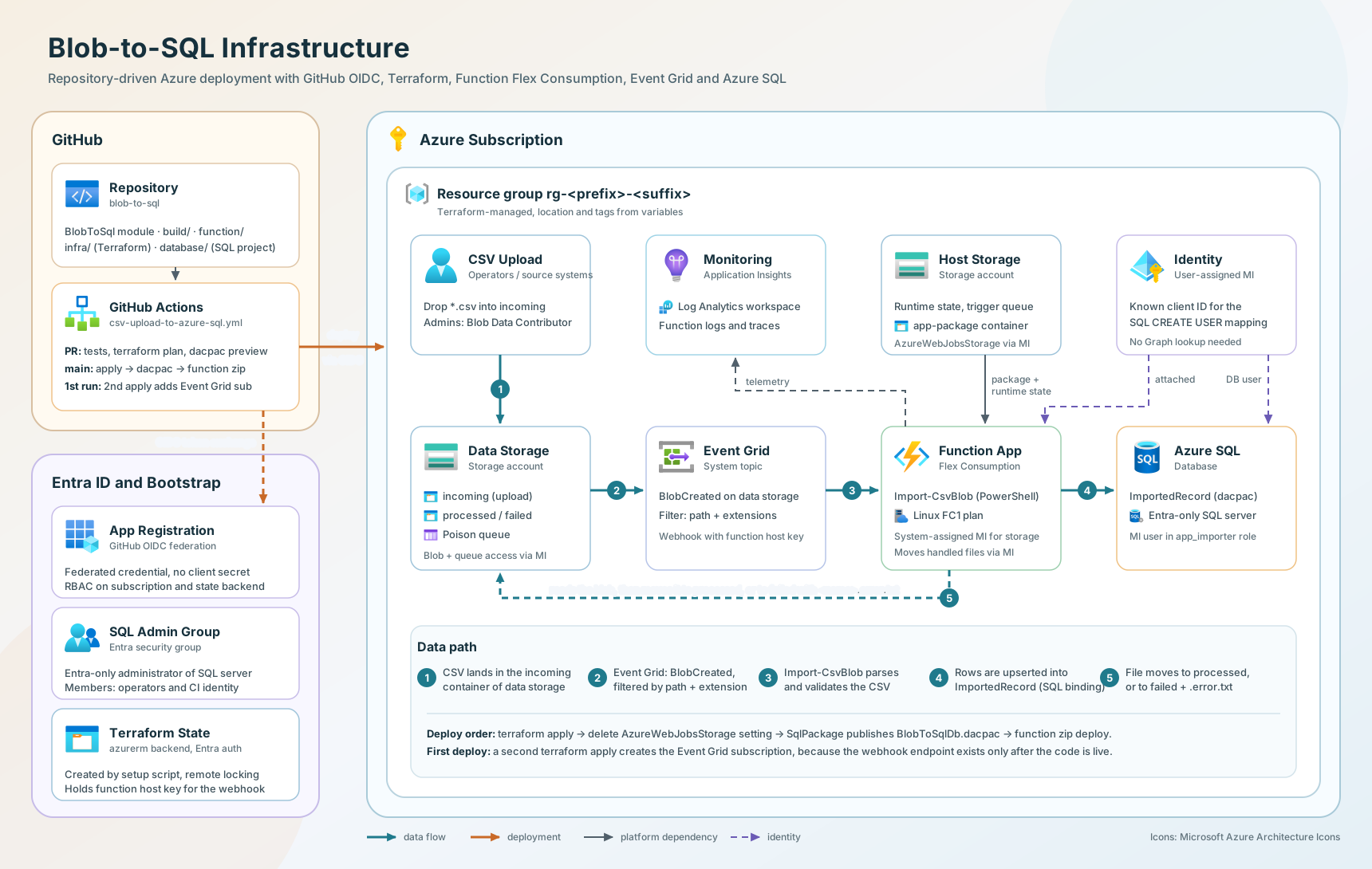
The data path has five hops:
- A client uploads a CSV file to the
incomingcontainer of the data storage account. - The storage account’s Event Grid system topic raises a
Microsoft.Storage.BlobCreatedevent. - An event subscription filters for
.csvfiles inincomingand calls the blob extension webhook of the Function App. - The PowerShell function
Import-CsvBlobparses the file and returns row objects. The SQL output binding writes them intodbo.ImportedRecordwith aMERGE. - The wrapper moves the file to the
processedcontainer. A rejected file goes tofailedinstead, together with<name>.error.txt.
The supporting pieces:
| Component | Purpose |
|---|---|
| Function App | Runs the import. System-assigned identity for storage, user-assigned identity for SQL. |
| Host storage account | Deployment package, runtime state and the blob trigger’s internal queue. |
| Data storage account | The incoming, processed and failed containers. |
| Azure SQL | Holds the imported data. |
| Application Insights + Log Analytics | Logs and traces. |
| Terraform (azurerm 5.x) | Deploys all of the above. |
| SQL database project | Table, role and grants, deployed as a .dacpac. |
| GitHub Actions | Plan on pull request, deploy on main, OIDC login. |
Why this uses Event Grid instead of the classic blob trigger
The classic blob trigger polls the container and scans the blob logs. On the Flex Consumption plan that mode is not supported. Flex only supports the Event Grid-based blob trigger, where the binding is still a blobTrigger but with "source": "EventGrid", and Event Grid pushes the notification to the webhook /runtime/webhooks/blobs.
That is not a limitation, it is an improvement. The function runs within seconds of the upload, and nothing polls an empty container all day long.
The event subscription does the filtering before the function is ever called:
1
2
3
4
5
6
7
8
9
10
11
12
13
14
15
16
17
18
19
20
21
22
23
24
25
26
27
28
29
resource "azurerm_eventgrid_system_topic_event_subscription" "txt_created" {
  count                = var.enable_event_subscription ? 1 : 0
  name                 = "txt-created-to-func"
  system_topic         = azurerm_eventgrid_system_topic.data.name
  resource_group_name  = azurerm_resource_group.rg.name
  included_event_types = ["Microsoft.Storage.BlobCreated"]

  subject_filter {
    subject_begins_with = "/blobServices/default/containers/${var.input_container_name}/blobs/"
    case_sensitive      = false
  }

  advanced_filter {
    string_ends_with {
      key    = "subject"
      values = var.file_extensions
    }

    # Only fire when the blob is fully committed
    string_in {
      key    = "data.api"
      values = ["PutBlob", "PutBlockList", "FlushWithClose", "CopyBlob"]
    }
  }

  webhook_endpoint {
    url = "https://${azurerm_function_app_flex_consumption.func.default_hostname}/runtime/webhooks/blobs?functionName=Host.Functions.${local.function_name}&code=${data.azurerm_function_app_host_keys.func[0].blobs_extension_key}"
  }
}
Two details matter here. subject_ends_with only takes a single value, so for a list of extensions you need string_ends_with in an advanced_filter. And the data.api filter makes sure the function only fires when a blob has been committed completely, not on every intermediate block of a large upload.
Note the count. It exists because of a the problem with creating the event subscription before the function app is fully deployed, which I cover in the pipeline section.
From PowerShell module to Azure Function
I didn’t write the function app from scratch. The project is scaffolded from the AzureFunction template of PSModuleDevelopment. The idea of that template is simple: you write a normal PowerShell module, and every function in a trigger folder like functions/httpTrigger or functions/timerTrigger becomes an endpoint of that kind. The build generates the run.ps1 and function.json files for you.
The template had no blob trigger, so I added one. Anything under BlobToSql/functions/blobTrigger is now published as a blob-triggered endpoint, configured in build/build.config.psd1:
1
2
3
4
5
6
7
8
9
10
11
12
13
14
15
16
17
BlobTrigger      = @{
    # Container/path pattern. {name} = blob name
    Path                = 'incoming/{name}'

    # Prefix of the identity-based connection settings
    Connection          = 'DataStorage'

    # EventGrid: required on Flex Consumption
    Source              = 'EventGrid'

    # Azure SQL output binding
    SqlOutput           = @{
        Name                    = 'SqlOutput'
        CommandText             = 'dbo.ImportedRecord'
        ConnectionStringSetting = 'SqlConnectionString'
    }
}
The generated run.ps1 wrapper is small. It passes only the parameters the command declares, pushes the command’s output to the SQL output binding and moves the file out of the input container (shortened):
1
2
3
4
5
6
7
8
9
10
11
12
13
14
15
16
17
18
19
20
21
22
23
24
25
26
27
28
29
Import-Module -Name 'BlobToSql'

$command = Get-Command -Name '%COMMAND%'
$parameters = @{}
if ($command.Parameters.ContainsKey('InputBlob')) {
	$parameters.InputBlob = $InputBlob
}
if ($command.Parameters.ContainsKey('BlobName')) {
	$parameters.BlobName = $TriggerMetadata.Name
}

$moveParam = @{
	BlobServiceUri = $env:DataStorage__blobServiceUri
	BlobPath       = $TriggerMetadata.BlobTrigger
}

try {
	$results = & $command @parameters -ErrorAction Stop
} catch {
	# Retrying the same content would fail again: move it aside with the reason
	Move-TriggerBlob @moveParam -TargetContainer $env:BLOB_FAILED_CONTAINER -ErrorMessage $_.Exception.Message
	Write-Error -Message "Rejected '$($TriggerMetadata.Name)': $($_.Exception.Message)" -ErrorAction Continue
	return
}

if ($results) {
	Push-OutputBinding -Name 'SqlOutput' -Value @($results)
}
Move-TriggerBlob @moveParam -TargetContainer $env:BLOB_PROCESSED_CONTAINER
The explicit Import-Module at the top looks redundant, because PowerShell loads modules automatically. It isn’t. I’ll come back to it in the traps section.
Move-TriggerBlob is a small helper in the module. It gets a token for https://storage.azure.com/ from the managed identity endpoint, copies the blob server-side with Put Blob From URL, and deletes the source. The targets are separate containers on purpose: a copy to a folder inside incoming would raise BlobCreated again and trigger the function a second time. Because Event Grid delivers at least once, a missing source is not an error. Another invocation simply got there first.
Handling real-world CSV files
“Just parse the CSV” is where most import scripts break. Files come from German Excel with semicolons and decimal commas, from other systems with commas and decimal points, sometimes in UTF-8, sometimes in Windows-1252. The function handles that without configuration where it can.
Columns are matched by header name. The expected columns live in one place, BlobToSql/internal/scripts/schema.ps1:
1
2
3
4
5
6
7
8
9
10
11
12
13
14
15
16
17
18
$script:ImportSchema = @(
	[PSCustomObject]@{
		Column   = 'MeasuredAt'
		Type     = 'DateTime'
		Required = $true
	}
	[PSCustomObject]@{
		Column    = 'DeviceId'
		Type      = 'String'
		Required  = $true
		MaxLength = 100
	}
	[PSCustomObject]@{
		Column   = 'Value'
		Type     = 'Decimal'
		Required = $true
	}
)
Column order doesn’t matter, extra columns are ignored with a warning, and missing required columns fail the file with a message that also names the delimiter it used. That last part saves a lot of guessing when a file was parsed with the wrong delimiter.
The delimiter is detected from the header line. Get-CsvDelimiter counts ;, , and tab in the first line and picks the most frequent one. You can still pin it with the CSV_DELIMITER app setting.
The encoding is detected as well. My first version had a fixed CSV_ENCODING = utf-8, and the first German Excel export turned Kühlraum-Süd into K?hlraum-S?d in the database. The columns were NVARCHAR, so SQL was not the problem. Excel’s classic “CSV (Trennzeichen-getrennt)” format writes Windows-1252, where ü is the single byte 0xFC. That byte is not valid UTF-8, so the decoder replaced it with U+FFFD, which SQL shows as ?. ConvertTo-CsvText now decides in this order:
- A byte order mark wins: UTF-8, or UTF-16 from Excel’s “Unicode Text” export.
- Without a BOM, the bytes go through a strict UTF-8 decoder that throws instead of replacing. If it succeeds, the file is UTF-8.
- Otherwise the file is read as Windows-1252.
Decimals in both notations. ConvertTo-ImportValue treats the last separator as the decimal separator:
1
2
3
4
5
6
7
8
$normalized = $text -replace '\s', ''
$lastDot = $normalized.LastIndexOf('.')
$lastComma = $normalized.LastIndexOf(',')
if ($lastComma -gt $lastDot) {
	$normalized = $normalized.Replace('.', '').Replace(',', '.')
} else {
	$normalized = $normalized.Replace(',', '')
}
So 21.5, 21,5, 1.234,75 and 1,234.75 all work. The price is one ambiguous case: 1,234 is read as 1.234, not as one thousand two hundred thirty-four. For measurements that is the right call. For your data it might not be.
Timestamps are stored as UTC. ISO 8601 and the German dd.MM.yyyy HH:mm format are both accepted. A value with Z or an offset keeps its meaning. A value without an offset is interpreted in CSV_SOURCE_TIMEZONE, for example Europe/Berlin, and converted to UTC. That setting uses IANA time zone names, which work because Flex Consumption runs on Linux.
A file like this one imports cleanly:
MeasuredAt;DeviceId;Value
25.09.2026 08:00;sensor-01;21,5
2026-09-25T08:05:00Z;sensor-01;1.234,75
25.09.2026 08:10:30;"sensor;02";-3,2
Three rules make the import predictable:
All or nothing. The function validates every row and collects all errors first. If a single value is invalid, it throws with a list of the first 20 problems, and nothing is written. Half-imported files are worse than failed ones, because nobody notices them.
Failed files. The wrapper moves the file to the failed container and writes the error list to <name>.error.txt next to it. The person who uploaded the file can open both side by side.
Idempotent. The table’s primary key is (SourceBlob, RowNumber), and the SQL output binding performs a MERGE on the primary key. Processing the same file twice updates the same rows instead of duplicating them. This is not optional polish. Event Grid guarantees at-least-once delivery, so the same event can arrive more than once.
How each connection authenticates
Here is how each connection authenticates.
Function App to storage
Both storage accounts have shared_access_key_enabled = false. The Function App’s system-assigned identity gets data-plane roles instead:
| Scope | Role | Why |
|---|---|---|
| Host storage | Storage Blob Data Owner | Deployment package, runtime state, blob receipts |
| Host storage | Storage Queue Data Contributor | Internal queue of the Event Grid blob trigger |
| Data storage | Storage Blob Data Owner | Read the blob, move it to processed or failed |
| Data storage | Storage Queue Data Contributor | Poison queue |
The queue role on the host storage is easy to miss. The Event Grid blob trigger doesn’t process the webhook call directly. It puts the event into an internal queue in the host storage account and processes it from there.
The connections are identity-based app settings. Instead of a connection string there is a prefix with an account name or service URIs:
1
2
3
4
5
6
7
8
9
app_settings = {
  "AzureWebJobsStorage__accountName" = azurerm_storage_account.host.name

  "DataStorage__blobServiceUri"  = azurerm_storage_account.data.primary_blob_endpoint
  "DataStorage__queueServiceUri" = azurerm_storage_account.data.primary_queue_endpoint

  "BLOB_PROCESSED_CONTAINER" = azurerm_storage_container.processed.name
  "BLOB_FAILED_CONTAINER"    = azurerm_storage_container.failed.name
}
The blob trigger needs queueServiceUri as well, because it keeps its poison messages in a queue. Without it, the trigger fails as soon as it tries to report a failed blob.
What is not in that list matters just as much: there is no AzureWebJobsStorage setting. Not even an empty one. This one cost me the most time of the whole project.
azurerm provider issue #29693: with identity-based storage, the provider still writes a connection string with an empty key into AzureWebJobsStorage, on every create and every update of the app. Microsoft’s own Flex Consumption Terraform sample works around that with "AzureWebJobsStorage" = "". I copied it, and with an HTTP trigger that is enough.
With the blob trigger it isn’t. The Event Grid webhook validation failed with HTTP 500, and Application Insights showed why:
1
2
3
Error indexing method 'Functions.Import-CsvBlob'.
Unable to find matching constructor while trying to create an instance of BlobServiceClient.
Found the following configuration keys: accountName
The blob trigger uses the host storage too, for its receipts and its internal queue. The Storage extension decides whether a connection is a connection string with this check:
1
return configuration is IConfigurationSection section && section.Value != null;
An empty string is not null. So "" counts as a connection string, the extension never looks at __accountName, the function fails indexing, and the webhook can’t answer the validation request. The setting has to be absent.
Terraform alone can’t get there, because the provider writes the value back on every update. So the deploy workflow deletes it right after terraform apply:
1
2
3
4
5
present=$(az functionapp config appsettings list -g "$rg" -n "$app" \
  --query "[?name=='AzureWebJobsStorage'].name" --output tsv)
if [ -n "$present" ]; then
  az functionapp config appsettings delete -g "$rg" -n "$app" --setting-names AzureWebJobsStorage --output none
fi
For that to stick, Terraform must not update the app on every run. But it did it because Azure adds a hidden-link: /app-insights-resource-id tag when Application Insights is connected, Terraform removed it on every apply, and every update brought AzureWebJobsStorage back. An ignore_changes on that one tag fixes it:
1
2
3
4
5
lifecycle {
  ignore_changes = [
    tags["hidden-link: /app-insights-resource-id"],
  ]
}
Function App to Azure SQL
The SQL server runs with azuread_authentication_only = true, so SQL logins don’t exist at all. The connection string of the output binding uses Authentication=Active Directory Managed Identity:
1
Server=tcp:<server>.database.windows.net,1433;Database=sqldb-blob2sql;Authentication=Active Directory Managed Identity;User Id=<client id>;Encrypt=True;
There is one important thing to notice. You would normally create the database user with:
1
CREATE USER [func-blob2sql-abcde] FROM EXTERNAL PROVIDER;
When a service principal (our pipeline) runs that statement, the SQL server looks the name up in Microsoft Graph, using its own identity. That identity needs the Entra Directory Readers role, which is a tenant-wide grant that many organizations won’t hand out for a single project.
The way around it is to create the user from the identity’s client ID, without any directory lookup:
1
CREATE USER [id-blob2sql-sql-abcde] WITH SID = 0x..., TYPE = E;
The SID is the client ID converted to binary. That creates a new requirement: whoever runs the SQL script must know the client ID. For a system-assigned identity, Terraform only exposes the principal ID. The client ID is only available through Microsoft Graph. So the Function App gets a second, user-assigned identity just for SQL, whose client ID Terraform knows. Storage keeps using the system-assigned identity.
The identity only gets what the MERGE needs, through a dedicated role:
1
2
CREATE ROLE [app_importer] AUTHORIZATION [dbo];
GRANT SELECT, INSERT, UPDATE ON OBJECT::[dbo].[ImportedRecord] TO [app_importer];
No db_datawriter, no DELETE, no access to other tables.
GitHub Actions to Azure
The pipeline logs in with OIDC. GitHub issues a short-lived token for the workflow run, and Entra ID trusts it through a federated credential on an app registration. The app registration has no secret at all.
The federated credentials are bound to exactly two subjects: the GitHub environment csv-upload-to-azure-sql for deployments, and pull_request for plans. A workflow running in any other context doesn’t get a token Azure accepts.
One-time bootstrap
Everything the pipeline needs before its first run is created by one idempotent script, scripts/New-GitHubDeploymentIdentity.ps1. Run it once with an account that is Owner on the subscription:
1
2
3
4
5
6
7
8
9
10
Connect-AzAccount -Tenant <tenant>.onmicrosoft.com
gh auth login   # only for -ConfigureGitHub
$identityParam = @{
    Repository        = '<owner>/BlogAssets'
    SubscriptionId    = '<subscription-id>'
    AppName           = 'gh-blob-to-sql-deploy'
    SqlAdminGroupName = 'sg-blob-to-sql-sql-admins'
    ConfigureGitHub   = $true
}
./scripts/New-GitHubDeploymentIdentity.ps1 @identityParam
It creates or reuses:
- Resource provider registrations. azurerm 5.x no longer registers providers automatically.
- The app registration and service principal, without a secret, plus the two federated credentials.
- RBAC on the subscription.
Contributor, plusRole Based Access Control Administratorwith a condition that only allows assigning the three storage data roles the Terraform code uses. The pipeline can grant the Function App access to blobs and queues, but it cannot make itself Owner. - Terraform state storage. A storage account with Entra ID auth only, versioning and soft delete. This matters because the state contains the blob extension key for the Event Grid webhook.
- An Entra group as SQL admin, with the service principal and you as members. Using a group means the pipeline and a human can both administer the server without swapping the admin back and forth.
- GitHub variables and the environment (with
-ConfigureGitHub). These are variables, not secrets, because none of the values are secret: client ID, tenant ID and subscription ID are identifiers, not credentials.
If a run fails halfway, run it again. Every step checks whether its result already exists.
Deployment pipeline
The workflow lives in .github/workflows/csv-upload-to-azure-sql.yml and does two different things depending on the trigger.
| Trigger | What happens |
|---|---|
Pull request to main | Parser tests, function package build, dacpac build, terraform plan and the T-SQL a databasepublish would run. Both previews go to the job summary. |
Push to main or manual run | The same tests and builds, then terraform apply, dacpac publish, function code publish and, on the first run, the Event Grid subscription. |
The pull request view is the one I like most. A reviewer sees the Terraform plan and the generated SQL change script side by side, before anything touches Azure.
Bootstrapping the Event Grid subscription
When you create an Event Grid subscription with a webhook, Event Grid immediately sends a validation request to that URL. The Functions blob extension answers it, but only if the function is already deployed. On an empty environment it isn’t, because Terraform creates the Function App in the same apply. The subscription creation fails.
The pipeline solves it in three steps:
- Check whether
Import-CsvBlobis already deployed. - If not, run
terraform applywithenable_event_subscription=false, delete theAzureWebJobsStoragesetting the provider wrote, publish the database and the function code, and wait until the function shows up. - Run
terraform applyagain withenable_event_subscription=true.
On every later run the function already exists, so the subscription simply stays in place.
Waiting “until the function shows up” has a catch: az functionapp function show also lists a function that failed indexing. If the validation still fails with HTTP 500, look for Error indexing method in Application Insights, not at Event Grid.
Long jobs and expiring OIDC tokens
After the first terraform apply, the OIDC token from GitHub may have expired by the time the later steps run.
1
AADSTS700024: Client assertion is not within its valid time range.
That’s why we add a second and third azure/login step right before the parts that use az after a long step.
Terraform isn’t affected, because with ARM_USE_OIDC it fetches a fresh GitHub token on its own. The CLI doesn’t.
Deploying database changes with a dacpac
The schema lives in database/BlobToSqlDb, an SDK-style SQL project (Microsoft.Build.Sql). You declare the table as a plain CREATE TABLE, and dotnet build compiles it into a .dacpac and runs static code analysis. At deployment time, SqlPackage compares the dacpac with the live database and generates the ALTER statements itself.
The publish options keep it safe:
BlockOnPossibleDataLoss=True: dropping a column or narrowing a type stops the deployment instead of silently losing data.DropObjectsNotInSource=False: objects in the database that aren’t in the project are left alone.ExcludeObjectTypes=Users;Logins;RoleMembership: SqlPackage never touches users. They are environment-specific and handled by an idempotent post-deployment script that runs theCREATE USER ... WITH SIDshown above.
The dacpac is built once in the test job and passed on as an artifact. The same build is previewed in the pull request and deployed on main.
For the publish, the runner opens a firewall rule for its own IP address and removes it again afterwards, also when the publish fails.
Traps and edge cases
A few things that I learned along the way.
Managed dependencies don’t exist on Flex. The requirements.psd1 mechanism that downloads modules at runtime is not supported on Flex Consumption. The template’s FlexConsumption = $true setting disables it and bundles required modules into the package at build time instead.
Deploying code to Flex. Publish-AzWebApp is not a documented deployment method for Flex Consumption. The build uses az functionapp deployment source config-zip.
Module auto-loading races. When I uploaded four files at once, some of them failed with “Import-CsvBlob is not recognized as a name of a cmdlet”. The same file worked on the next retry. The pattern in Application Insights: it only happened in a freshly started worker that got two invocations at the same moment. The PowerShell worker runs parallel invocations in separate runspaces, and when both auto-load the same module at the same time, one of them can lose. An explicit Import-Module at the top of run.ps1 fixed it.
The PSFramework.NuGet bootstrap only works on Windows. The template’s psf-build.ps1 loads PSFramework.NuGet by piping a bootstrap.ps1 from GitHub into Invoke-Expression. On an Ubuntu runner it fails with Cannot bind argument to parameter 'Path' because it is null: it uses $env:TEMP, ; as the PSModulePath separator and backslashes. Install-Module with a pinned version from the PowerShell Gallery works everywhere. It also stops the build from running whatever is on someone else’s master branch.
Shell scripts committed from Windows aren’t executable. Git on Windows doesn’t record the executable bit, so the CI helpers failed on the runner with Permission denied and exit code 126. git update-index --chmod=+x sets it in the index.
terraform output on an empty state succeeds. With no state yet, terraform output -raw <name> prints a warning and exits with 0. My helper script took that as “outputs exist” and passed an empty resource group to the next step. An empty value now counts as missing.
Role assignments take time. Right after the first deployment, the new role assignments may not have propagated yet. The first invocations can fail and then succeed on retry. That is expected, and the retry policy handles it.
The move happens before the SQL write. The SQL output binding writes after run.ps1 returns, and it has no retries of its own. If that write fails, the runtime retries the invocation, but the file is already in processed, so the retry finds nothing. The run shows up as failed in Application Insights, and copying the file back to incoming imports it again. With the default Basic SKU this is rare.
Testing it end to end
Once deployed, upload a sample file with your own Entra identity, no key needed:
1
2
3
4
5
6
7
8
$upload = @(
    '--auth-mode', 'login'
    '--account-name', '<data storage account>'
    '--container-name', 'incoming'
    '--file', './tests/sample-semicolon.csv'
    '--name', 'sample.csv'
)
az storage blob upload @upload
A few seconds later the rows are in the database, and sample.csv has moved to the processed container:
1
SELECT * FROM dbo.ImportedRecord WHERE SourceBlob = 'sample.csv';
Upload tests/sample-invalid.csv to see the other path: nothing is written, and the file ends up in the failed container next to sample-invalid.csv.error.txt with the list of problems. tests/sample-ansi.csv is a Windows-1252 export with umlauts, a good check that the encoding detection works.
That’s it for this blog post.
The complete project is on GitHub. If you build something similar, or find a trap I missed, I’d love to hear about it.